Thanks for your great service. SocketXP IoT Remote Access Solution works like a charm.
Tobias
freshtaste.de
Keep your devices secure, up-to-date, and performant with our seamless Over-the-Air (OTA) update solution.
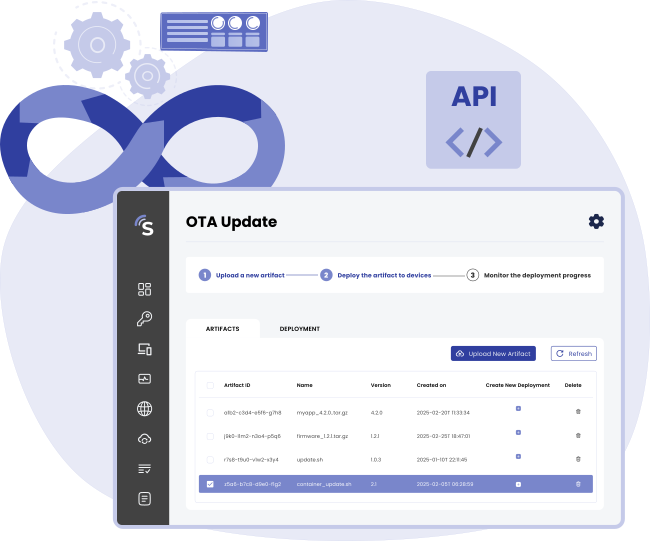











OTA update refers to the wireless delivery of new software, firmware, docker containers, configuration or other data to a device.

OTA update eliminates the need to physically connecting your IoT device via USB or other cable to update it. For example, updates to vehicle software(including infotainment systems, navigation, and even safety features), updates to firmware for smart home devices, wearables, mobile phones, and other connected gadgets are all performed wirelessly through OTA updates.
Read MoreSocketXP OTA Update simplifies remote software deployment for IoT devices, ensuring secure, automated, and efficient updates with minimal downtime. Keep your devices running smoothly while reducing operational complexity.


Streamline your update processes and free up valuable IT resources for other critical tasks.

Minimize disruptions to your operations with automated updates that happen in the background.

Centrally manage and monitor updates for your entire device fleet from a single, intuitive console.

All data transmitted to and from the SocketXP cloud gateway is encrypted using SSL/TLS, ensuring secure delivery of OTA updates. Encryption protects update files from potential eavesdropping and tampering.

Quickly check performance and resolve issues remotely in real-time.SocketXP OTA Update can wirelessly update software on a fleet of devices with a single click of a button.

Ensure consistent performance and stability across your devices with the latest software and bug fixes.
SocketXP OTA Update simplifies remote software updates for IoT and embedded devices. Deploy new features, bug fixes, and security patches seamlessly across your entire device fleet with automation, monitoring, and rollback capabilities.


Track the progress of updates in real-time and receive notifications upon successful completion or any issues.

Easily revert to previous versions of the software if needed, ensuring business continuity.

Seamlessly integrate with your existing infrastructure and workflows using SocketXP OTA Update APIs.

Package and distribute software updates, including new features, bug fixes, security patches and configuration files, to your devices. Supports Docker container updates.

Define update schedules and automate software deployments, ensuring that devices receive updates without manual intervention. Reduce the risk of human error and ensure timely updates.
Find quick answers to the most common questions about this topic.
An OTA update is a wireless method of delivering firmware, software, application binaries, Debian packages, or container images to IoT devices without requiring physical access. SocketXP's OTA update platform lets you push updates to individual devices or your entire fleet remotely and securely over the internet.
You upload a new firmware or software package to the SocketXP platform and define a deployment policy (target devices and rollout schedule). SocketXP delivers the update to the device via the secure agent tunnel, executes your installation script — including any rollback or health-check logic it contains — and reports success or failure back to the dashboard.
Yes. SocketXP supports automatic rollback: you add a health check to your installation script, and if it fails after an update, your script's own rollback logic restores the previous version. SocketXP executes this script on every device and reports the per-device result to the dashboard, so your fleet remains operational even if an update has issues.
Yes. SocketXP can deploy OTA updates for Docker container images, application binaries, firmware files, and Debian/APT packages. It supports any update artifact that can be installed via a shell script on a Linux device.
SocketXP uses device groups and RBAC (Role-Based Access Control) to control which devices receive which updates. Updates are cryptographically signed and delivered over the encrypted SocketXP tunnel, ensuring only authenticated devices can receive and apply them.
Yes. SocketXP lets you define a deployment schedule so updates are delivered and applied during off-peak hours or planned maintenance windows. This avoids disrupting device operation during business hours and reduces the risk of customer-facing downtime.
The update is queued. When the device reconnects to the internet and re-establishes its SocketXP tunnel, the platform automatically delivers the pending update. You can also configure expiry rules—if a device remains offline past a deadline, the update is cancelled and flagged for review.
Yes. SocketXP supports staged (canary) deployments. You can target a pilot group of devices first, monitor the deployment results and health checks, and then expand the rollout to the remaining fleet once you are confident the update is stable. This dramatically reduces the blast radius of a bad update.
Package your updated Python script or application along with a shell script that stops the old version, replaces the files, and restarts the service. Upload this package to SocketXP as an OTA update artifact, target your device group, and deploy. SocketXP delivers the package and executes the installation script remotely on each device.
Manual SSH updates require logging into each device individually, running commands, and tracking success yourself—which does not scale past a handful of devices and has no audit trail. SocketXP OTA delivers updates in parallel to thousands of devices simultaneously, with automatic rollback, per-device deployment status tracking, and a full audit log of what was deployed, when, and to which devices.
Hear from our satisfied customers about how SocketXP has transformed their IoT workflows with seamless connectivity, robust security, and unmatched reliability.