


Thanks for your great service. SocketXP IoT Remote Access Solution works like a charm.
Tobias
freshtaste.de
SocketXP gives you instant, secure IoT remote access to any Linux-based device behind NAT routers, firewalls, cellular networks, CGNAT — via SSH, VNC, RDP, or browser. No VPN. No port-forwarding. No on-site visits.
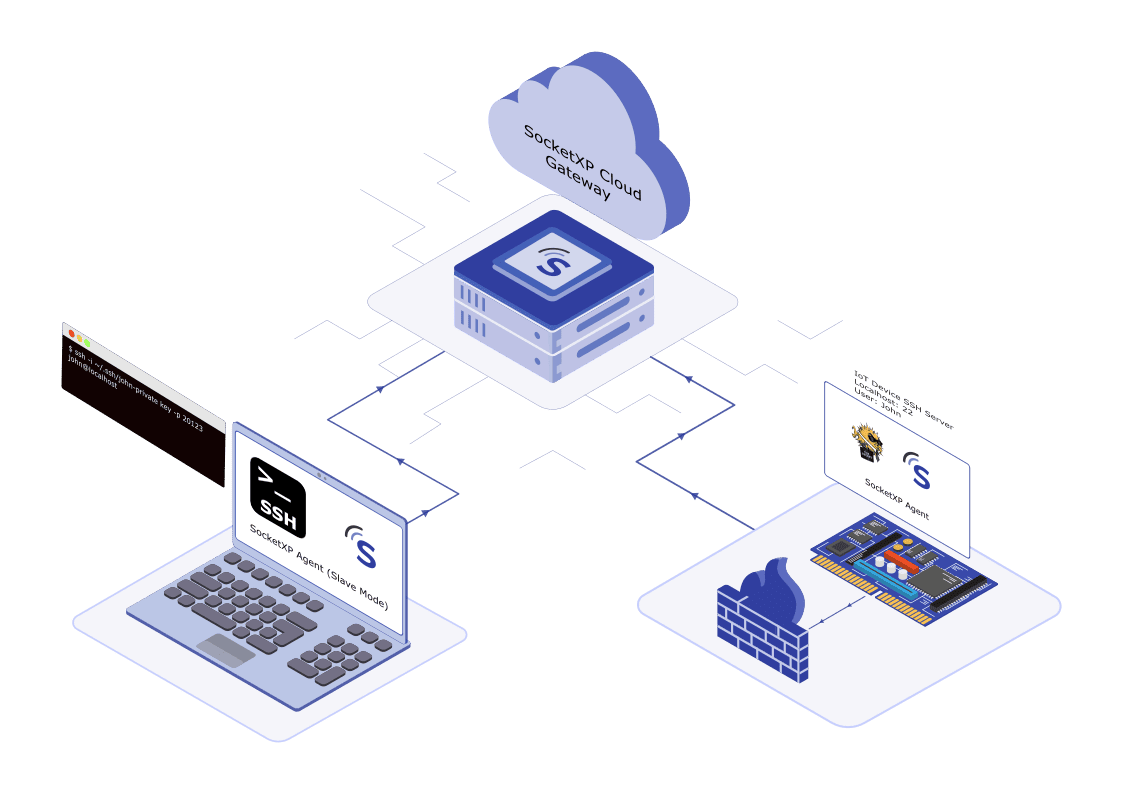









IoT remote access is the ability to connect to, monitor, and control an IoT device — over SSH, VNC, RDP, or a web browser — from anywhere, even when it sits behind a NAT router, firewall, cellular network, or CGNAT with no public IP address. SocketXP does this through an outbound-only SSL/TLS tunnel from the device to the SocketXP gateway. There's no port-forwarding, no VPN, and no inbound connection to the device — it stays reachable through a secure, authenticated connection whether you're managing one Raspberry Pi or a fleet of thousands.
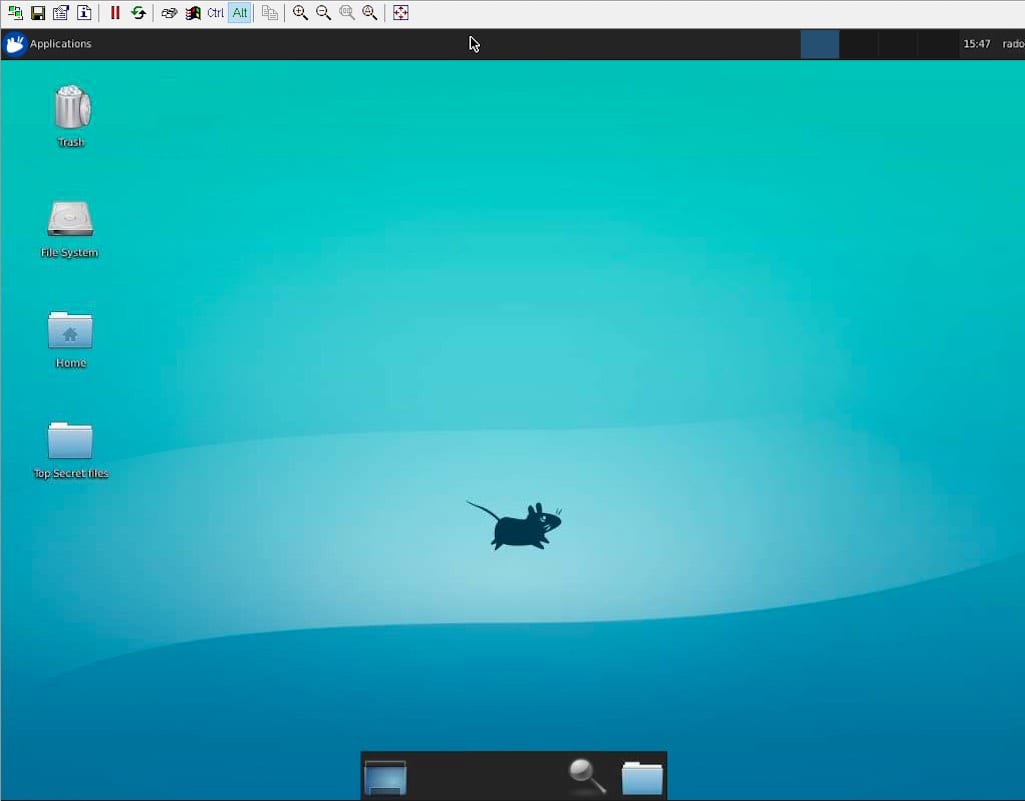

Quickly check performance and resolve issues remotely in real-time.

Access and organize files or update apps without being on-site.

Remote access your IoT devices without mouse, keyword or monitor.
Cut on-site visits, resolve issues faster, and keep every device secure — all without a VPN or open ports.

Catch and resolve device issues in minutes, not after a site visit.
Outbound-only, mTLS-secured connections with no open ports, ever.

Push OTA firmware and software updates without touching a device.

From one Raspberry Pi to 10,000+ devices, same platform.
SocketXP allows you to remotely SSH into your IoT from anywhere in the world, at any time, giving you unparalleled flexibility and convenience in remotely managing your device
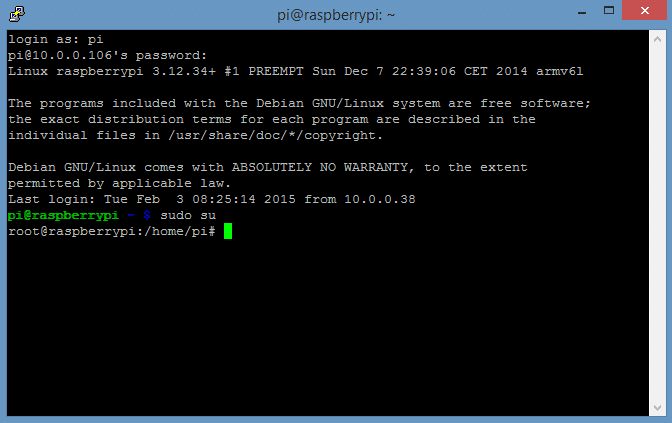

Seamlessly connect to devices behind NAT routers or firewalls using SSH.

Enhance security with SSH key authentication through clients like PuTTY.

Log in to your IoT SSH using a web browser — no additional setup required.
Experience full desktop access to your IoT devices remotely with VNC. Run applications, edit files, and interact with your IoT as if you're right in front of it, no matter where you are.

Access your IoT’s graphical interface securely from any location.
Run apps, edit files, and manage tasks on your IoT effortlessly.

Control IoT devices from anywhere with a reliable internet connection.

Easily configure and start managing your IoT remotely within minutes.
Securely manage your IoT web applications from any location. Leverage features like custom domains, SSL encryption, and remote connectivity to stay in control of your devices at all times.
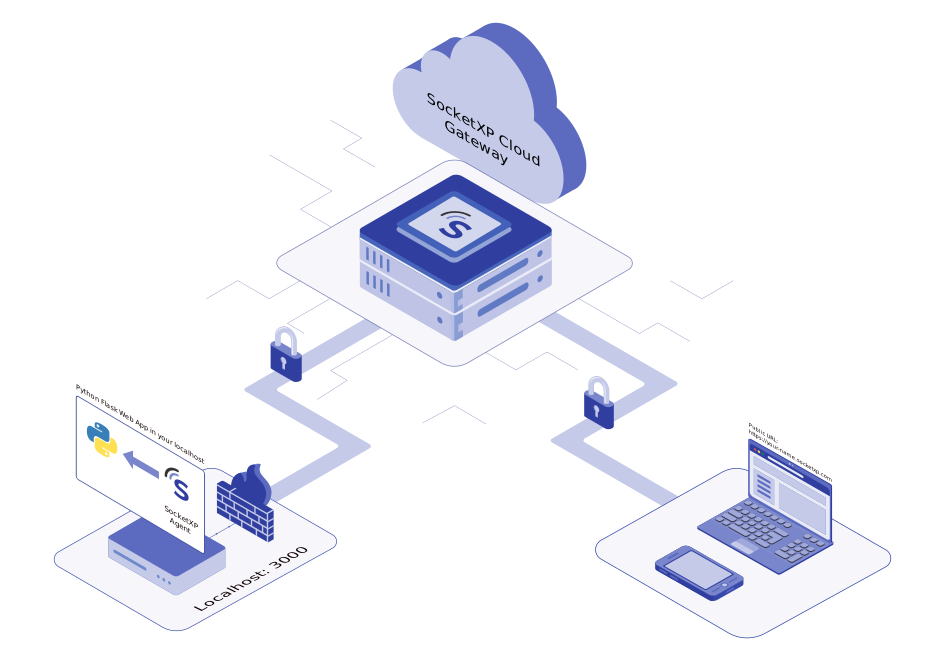

Easily connect to your IoT web apps with robust encryption and user-friendly design.

Access and manage web apps remotely with a public URL from anywhere, anytime.

Customize your domain and enable SSL for secure and branded access.
Access your IoT's desktop environment remotely with ease. Manage files, run applications, and navigate a familiar interface from anywhere in the world.
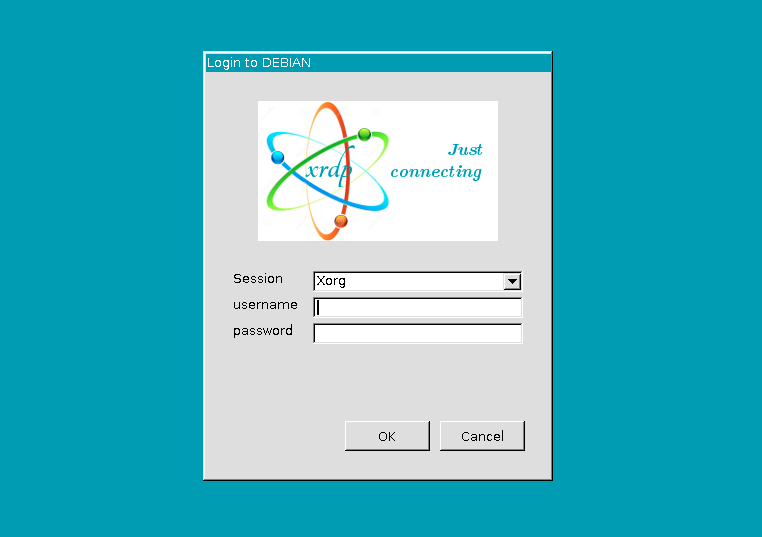
Take full control of your IoT devices remotely with Remote Desktop Protocol (RDP). Enjoy a seamless desktop experience, run applications, manage files, and navigate a user-friendly interface from anywhere in the world. With SocketXP's IoT Remote Desktop Access, you can say goodbye to command-line complexities and unlock the convenience of remote IoT management using xRDP.
Explore IoT Remote Access with RDP
Access your IoT desktop environment remotely to run applications and manage files with ease.

Skip the command line and enjoy a familiar and intuitive desktop interface for managing your IoT.

Set up remote IoT access with xRDP in minutes and start working smarter, wherever you are.
Eliminate the hassle of SSH logins for simple tasks. With SocketXP's IoT Remote Command Execution, control and automate device operations effortlessly—whether for a single IoT or an entire fleet.

Simplify Remote IoT Command Execution – Execute commands on single or multiple IoT devices without the hassle of SSH logins, ensuring efficiency and security.
Protect data with HTTPS, SSL encryption, and access tokens while integrating effortlessly with your IoT dashboard.

Execute commands remotely, whether at home, in the office, or on the go, for ultimate convenience.
Agriculture, Automotive, Healthcare, Smart energy, and Smart city deployments all rely on SocketXP to reach devices no technician can drive to every day.
Device downtime costs more than you think
$260,000/hourSocketXP remote access turns a site visit into a 5-minute fix
No firewall ports opened, no VPN setup required
Connect to any device, anywhere, in under a minute
Every SocketXP connection uses outbound-only tunnels, mTLS authentication, and full audit logs — no extra setup required.


device identity certificates, not shared passwords.

Engineers only reach the devices assigned to them.

Every session logged — who, what, when.

Cut off a device or user's access the moment it's flagged.
Find quick answers to the most common questions about this topic.
Yes. SocketXP creates only an outbound connection to our cloud gateway. All connections use mutual TLS (mTLS) authentication and end-to-end SSL/TLS encryption. SocketXP uses a Zero-Trust model — no inbound firewall ports are ever opened. Only authenticated and authorized users, after a successful SSO OIDC login, can connect to devices.
Traditional reverse tunneling tools such as Ngrok, Pinggy, and LocalXpose typically expose a publicly reachable open port in their cloud server that forwards traffic to your device. SocketXP takes a private remote access approach. Your IoT device makes an outbound, authenticated connection to the SocketXP Cloud Gateway, while a local proxy on your PC or laptop provides a private endpoint for remote access. No publicly reachable open ports.This lets you access devices behind NAT, firewalls, and CGNAT without directly exposing SSH, HTTP, MQTT, or other service ports to the public internet, making SocketXP a better fit for security-sensitive IoT and industrial environments.
Yes. SocketXP is purpose-built as a VPN-free IoT remote access solution. Traditional VPNs require you to open inbound firewall ports, manage a VPN server, and route all device traffic through a central gateway — creating a single point of failure and a broad attack surface. SocketXP uses device-initiated outbound SSL/TLS tunnels instead, so no firewall ports are ever opened on the device network. Each device gets its own isolated secure tunnel, making it far simpler to manage and more secure than a shared VPN. It also works over carrier-grade NAT (CGNAT), Starlink, and 4G/5G cellular networks where traditional VPNs typically fail.
Install the SocketXP agent on your IoT device. The agent creates an outbound SSL/TLS reverse proxy tunnel to SocketXP's cloud gateway — no port forwarding or firewall rule changes needed. You can then SSH, VNC, or RDP into the device from anywhere using the SocketXP web portal or standard clients.
SocketXP supports SSH, VNC, and RDP for full remote access and control, plus HTTP/HTTPS for reaching IoT web apps and dashboards. For file operations, SFTP and SCP are supported over the same secure tunnel. All protocols run over an outbound SSL/TLS connection, so no inbound ports are ever opened on the device.
A reverse SSH tunnel is an outbound connection from a device to a remote server that allows traffic to flow back in the opposite direction — enabling remote access without opening inbound firewall ports. SocketXP's agent creates an SSL/TLS-encrypted reverse proxy tunnel from each device to the SocketXP cloud gateway, making the device reachable from anywhere without any router or firewall reconfiguration.
Yes. SocketXP provides remote SSH access to Raspberry Pi without any port forwarding. Install the SocketXP agent on your Raspberry Pi and register it with the platform. SocketXP creates a secure outbound tunnel so you can SSH into the Pi from anywhere, even when it is behind a home router, firewall, or cellular network.
Yes. SocketXP includes a built-in web-based SSH terminal in the portal. Open a browser, go to your device in the SocketXP dashboard, and click Connect — no SSH client installation needed. The same portal provides a web-based SFTP file browser for remote file transfers.
Yes. SocketXP supports SFTP and SCP for remote file transfer. You can use the built-in SFTP browser in the SocketXP web portal, or any third-party SFTP client like FileZilla, WinSCP, or the OpenSSH scp command, to upload and download files securely over the SocketXP tunnel.
Yes. The SocketXP web portal is mobile-responsive, so you can SSH into or monitor your IoT devices from a smartphone or tablet browser.
Yes. You can add multiple team members to your SocketXP organization and assign role-based permissions (admin, member, viewer) controlling which devices or device groups each person can access. This makes it easy for an ops team to share fleet management without giving everyone full account control.
Yes. You can invite external users — customers, field engineers, or vendors — to your SocketXP account and grant them access to specific devices or device groups using RBAC. Access can be time-limited and revoked at any time, giving you full control over who can connect and when.
Yes. SocketXP is built for large-scale fleet deployments and scales to 100,000+ devices. Each device runs a lightweight agent that establishes a persistent outbound SSL/TLS tunnel — no open ports, no VPN, and no router configuration needed. Engineers can SSH, VNC, or RDP into any individual device, or run commands and push OTA updates across the entire fleet simultaneously. For a full architecture walkthrough, see our guide on IoT remote access for 10,000 devices.
Hear from our satisfied customers about how SocketXP has transformed their IoT workflows with seamless connectivity, robust security, and unmatched reliability.