
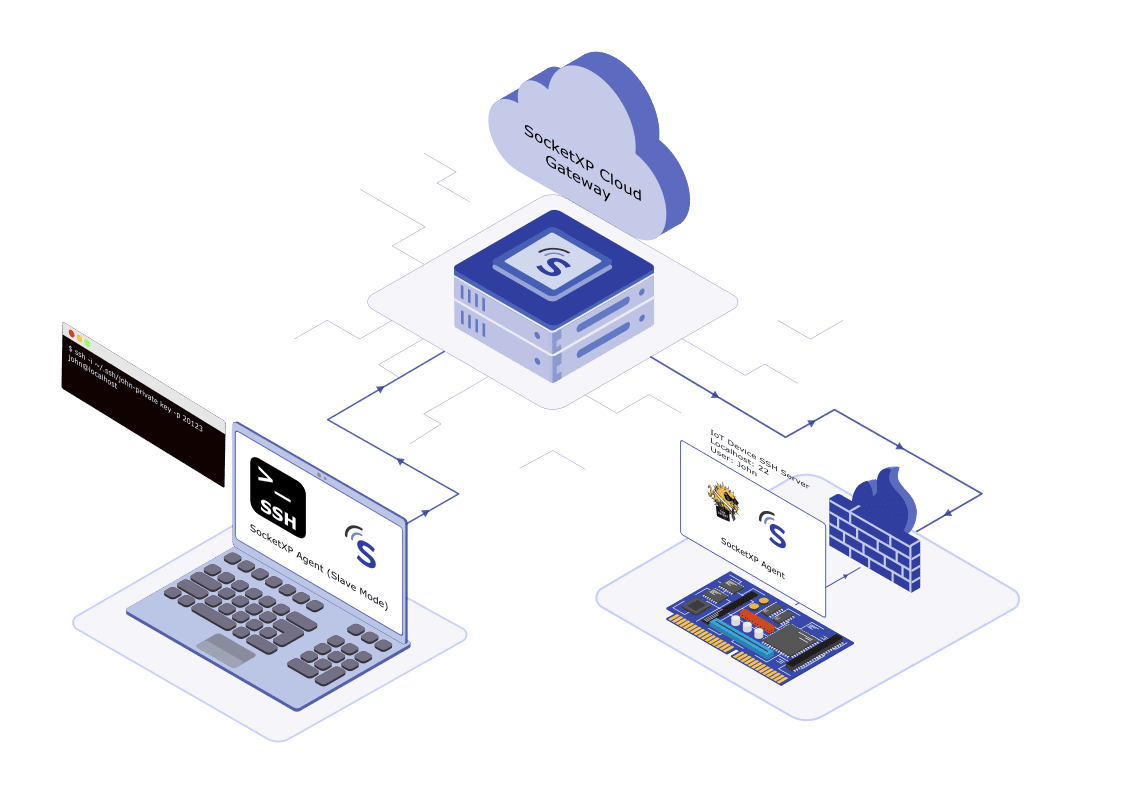
Raspberry Pi deployments span home labs, remote field sites, factory floors, and cloud-edge setups—but they all share one fundamental networking constraint: the Pi sits behind a NAT router or firewall with no directly reachable public IP address. Raspberry Pi remote access over the internet requires solving that connectivity problem cleanly, securely, and without brittle workarounds.
Get access in 3 steps:
- Install SocketXP agent on your Raspberry Pi (
socketxp login <token>) - Create the tunnel — run
socketxp connect tcp://localhost:22 - Connect from anywhere — SSH via the SocketXP web terminal in any browser, or use your SSH client via SocketXP slave mode on your laptop
No port forwarding, no static IP, no VPN infrastructure required. The same tunnel approach extends to VNC (port 5900), HTTP dashboards, and any TCP service on the Pi.
Why Accessing Raspberry Pi from Anywhere Is Difficult
A Raspberry Pi connected to a home or office network gets a private IP address (e.g., 192.168.1.x or 10.0.0.x) assigned by the router’s DHCP server. This address is not routable from the internet. Several layers block direct inbound access:
NAT (Network Address Translation): The router maps one public IP to many private devices. Unsolicited inbound traffic to port 22 or 5900 has no routing target unless port forwarding is explicitly configured—and even then, the configuration must be updated every time the Pi’s local IP changes.
CGNAT (Carrier-Grade NAT): Many ISPs, particularly mobile and cable providers, do not assign public IPv4 addresses to individual customers at all. Your router’s WAN interface gets a private IP address from the ISP’s own NAT layer. In this scenario, port forwarding is structurally impossible—there is no public IP on your router to forward from.
Firewalls: Corporate networks, school networks, and enterprise environments block inbound connections on non-standard ports. Even if a public IP exists, inbound SSH or VNC traffic may be dropped at the perimeter firewall.
Traditional workarounds—static IP, dynamic DNS + port forwarding, self-hosted VPN—add operational complexity, security exposure, or both. SocketXP eliminates all three by reversing the connection direction.
How SocketXP Solves Remote Raspberry Pi Access
SocketXP is a cloud-based IoT Remote Access and device management platform built around a secure reverse proxy tunnel architecture:
- The SocketXP agent on your Raspberry Pi initiates an outbound TLS connection to the SocketXP cloud gateway on port 443 (HTTPS-compatible)
- The cloud gateway holds this tunnel open and registers the Pi in your portal
- When you initiate an SSH or VNC session, traffic flows inward through the existing outbound tunnel
- No inbound port is opened on the router or firewall at any point
Because the Pi initiates the connection, the solution works behind NAT, CGNAT, and firewalls without any configuration changes on the network side.
Step 1: Enable SSH on Your Raspberry Pi
SSH is the most common access method for remote Raspberry Pi management. Enable it via raspi-config:
sudo raspi-config
# Navigate to: Interface Options > SSH > Enable
Or enable it directly via systemd:
sudo systemctl enable ssh
sudo systemctl start ssh
sudo systemctl status ssh
Step 2: Install the SocketXP Agent on Your Raspberry Pi
Step 2.1: Download and Install
Follow the download and install instructions to install the SocketXP agent on your Raspberry Pi. The agent provides binaries for arm (Pi Zero, Pi 2, Pi 3) and arm64 (Pi 4, Pi 5).
Step 2.2: Get Your Authentication Token
Sign up at the SocketXP Web Portal and retrieve your authentication token.
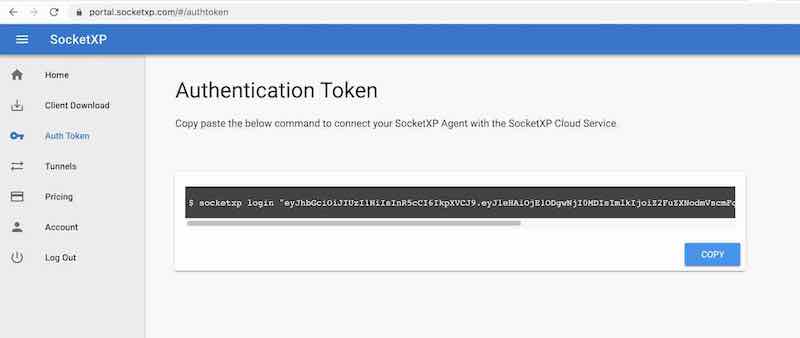
Authenticate the SocketXP agent on your Pi:
$ socketxp login [your-auth-token-goes-here]
Step 2.3: Connect the Raspberry Pi to SocketXP Cloud Gateway
$ socketxp connect tcp://localhost:22

Connected to SocketXP Cloud Gateway.
Access the device securely using the SocketXP agent in IoT Slave Mode.
Your Raspberry Pi now appears in the SocketXP web portal Devices list and is accessible from anywhere.
Step 3: Access Your Raspberry Pi from Anywhere
Method A: Browser-Based SSH Terminal (No Client Install Required)
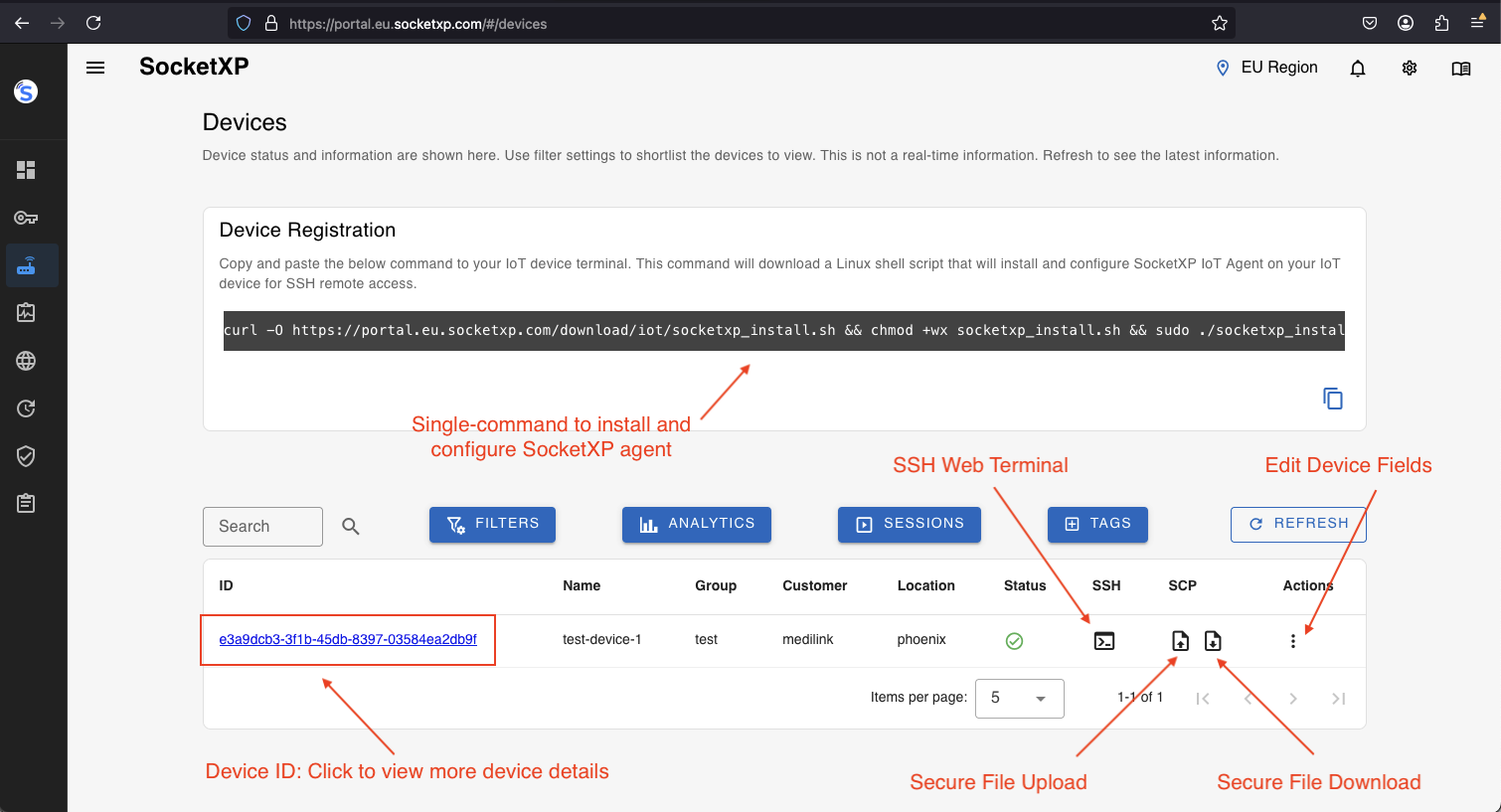
Log into the SocketXP Web Portal from any browser—on any device, anywhere in the world. Navigate to the Devices section, find your Raspberry Pi, and click the terminal icon.
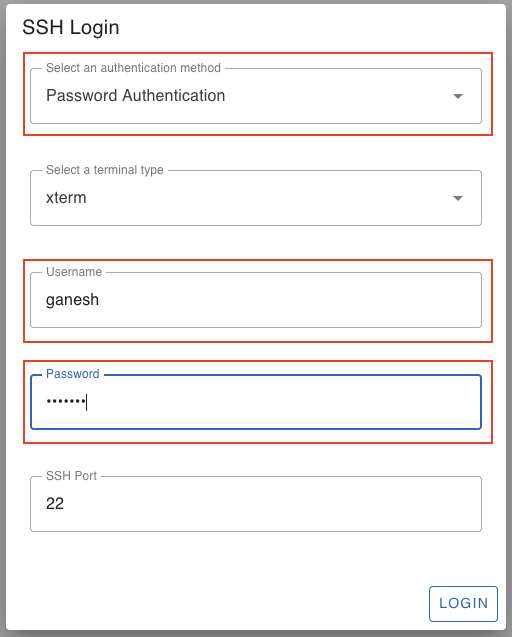
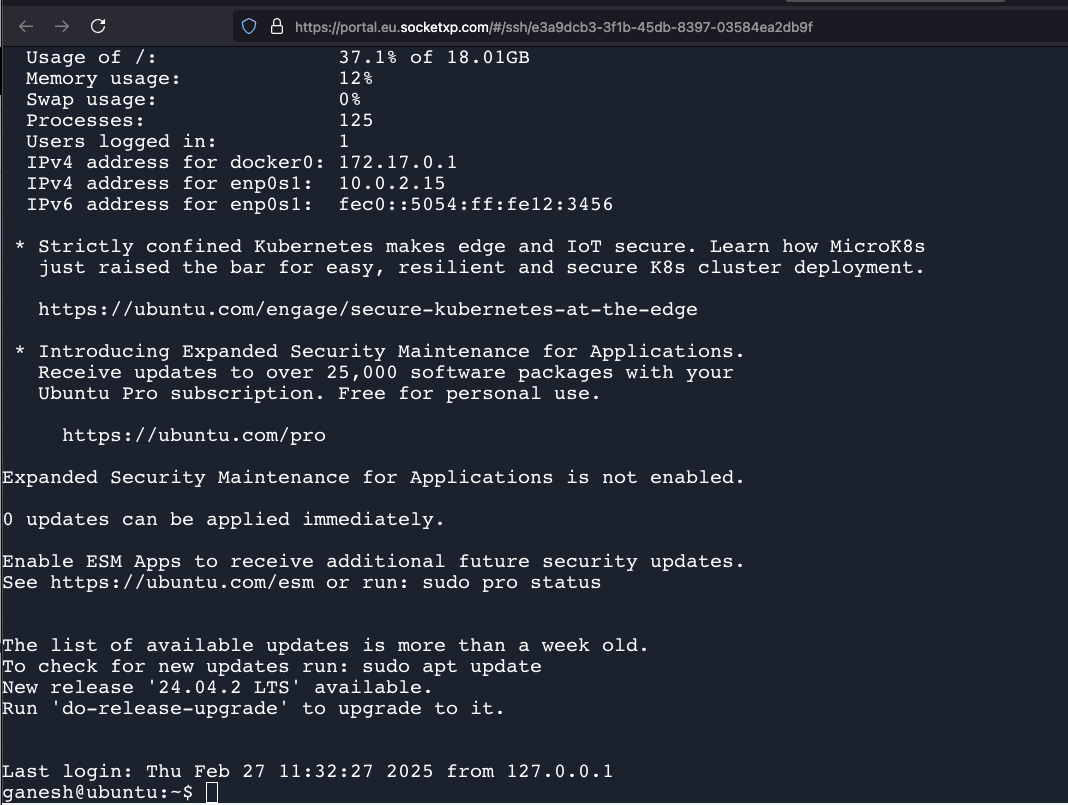
Provide your Pi’s login credentials. Once authenticated, you are dropped into an SSH shell on your Raspberry Pi directly in the browser—no SSH client installation required.
Method B: SSH Client via SocketXP Slave Mode
If you prefer a native SSH client (PuTTY on Windows, ssh on Mac/Linux), install the SocketXP agent on your access device and run it in slave mode:
$ socketxp connect tcp://localhost:3000 \
    --iot-slave \
    --peer-device-id "your-raspberry-pi-device-id" \
    --peer-device-port 22 \
    --authtoken your-auth-token

Listening for TCP connections at:
Local URL -> tcp://localhost:3000
Find your Pi’s device ID in the SocketXP Portal under Devices.
Then connect using any SSH client:
$ ssh -i ~/.ssh/id_rsa pi@localhost -p 3000
Or using PuTTY on Windows: host localhost, port 3000.
Method C: Access Raspberry Pi Web Apps from Anywhere
To access a web application running on your Raspberry Pi (Node-RED, Home Assistant, Grafana, Jupyter Notebook, Flask app, etc.) from anywhere, create an HTTP tunnel alongside the SSH tunnel:
$ socketxp connect http://localhost:1880
# Node-RED example on port 1880

Connected to SocketXP Cloud Gateway.
Public URL -> https://679aa48b-1162-44f7-b6c6-59129dd68b58.socketxp.com
The SocketXP portal provides a public HTTPS URL for the web application, accessible from any browser.
Access Methods Summary
| Access Method | SocketXP Feature Used | Best For |
|---|---|---|
| SSH from browser | Web terminal in portal | Quick access from any device |
| SSH from laptop/desktop | Slave mode local proxy | PuTTY, ssh CLI, Ansible |
| VNC desktop from laptop | Slave mode on port 5900 | GUI apps, visual debugging |
| Web app / dashboard | HTTP tunnel | Node-RED, Grafana, Home Assistant |
| File transfer (SCP/SFTP) | Slave mode on port 22 | Config files, logs, firmware |
Fleet Management: Access Multiple Raspberry Pis from Anywhere
If you manage multiple Raspberry Pi devices, SocketXP’s portal provides a centralized device list showing all connected Pis with their online/offline status, hostname, and OS details. Install the SocketXP agent on each Pi (using the single-touch install command from the portal), and all devices appear in one place—accessible from anywhere with a single login.
SocketXP vs Tailscale vs ngrok: Which is Right for Raspberry Pi Remote Access?
Engineers evaluating tools to access their Raspberry Pi from anywhere typically compare SocketXP, Tailscale, and ngrok. The distinctions matter significantly for production and fleet deployments:
| Criterion | ngrok | Tailscale | SocketXP |
|---|---|---|---|
| Architecture | Reverse proxy tunnel | Peer-to-peer mesh VPN | Secure reverse proxy tunnel |
| IoT fleet management | No | No | Yes — centralized device portal |
| Remote OTA firmware/app updates | No | No | Yes |
| Device health monitoring | No | No | Yes |
| Works behind CGNAT | Yes | Yes (DERP relay) | Yes |
| Session time limits (free tier) | Yes | No | No |
| Scales to 10,000+ IoT devices | Not designed for IoT | Mesh becomes complex | Native IoT multi-tenant architecture |
| VPN client required on access device | No | Yes | No — browser terminal available |
| SSH/VNC from mobile browser | No | No | Yes |
| Resource footprint on Pi | Low | Moderate (kernel-level VPN) | Minimal (lightweight userspace binary) |
ngrok is built for development workflows — exposing a local web server to share with a colleague or test a webhook. It imposes session time limits on the free tier, provides no device management portal, no OTA update delivery, and no monitoring. For production Raspberry Pi deployments at scale, it is the wrong tool.
Tailscale is a reliable mesh VPN that works well for small teams connecting a handful of devices. But for large Raspberry Pi fleets, the mesh topology adds operational complexity, requires the Tailscale VPN client to be installed on every engineer’s laptop and phone, and offers no IoT-specific capabilities — no remote firmware updates, no device health dashboards, no centralized device portal.
SocketXP is purpose-built for IoT and embedded Linux fleet management. A single lightweight agent on each Pi creates a persistent outbound tunnel to SocketXP’s cloud gateway. Access requires no VPN client on the engineer’s side — the SocketXP portal provides browser-based SSH terminals, device status, OTA update delivery, and resource monitoring. SocketXP’s architecture is designed from the ground up to handle tens of thousands of concurrent IoT device connections without the complexity of a VPN mesh.
Security Best Practices
- Disable SSH password authentication on the Raspberry Pi; use SSH key pairs exclusively to prevent brute-force attacks
- Use SocketXP RBAC to restrict which users in your organization can access which Raspberry Pi devices
- Rotate your SocketXP auth token on a regular schedule; immediately revoke tokens associated with decommissioned devices
- Run SocketXP as a systemd service so the tunnel is re-established automatically after network disruptions or device reboots
- Keep Raspberry Pi OS updated (
sudo apt update && sudo apt upgrade) to patch known SSH and system-level CVEs
Conclusion
Accessing your Raspberry Pi from anywhere over the internet—whether it’s in your home lab, at a remote site, or deployed behind CGNAT—requires solving a real networking problem. Port forwarding, dynamic DNS, and self-hosted VPNs each solve part of the problem while introducing new complexity and security risks.
SocketXP’s Raspberry Pi remote access solution solves the complete problem with a single lightweight agent on the Pi: secure outbound tunnel, no router changes, no static IP dependency, browser-accessible SSH terminal, and a centralized portal for managing Pi fleets at any scale.
For the full breakdown of all Raspberry Pi remote access methods — SSH, VNC, web apps, headless setup, Windows, Mac, and mobile — see the SocketXP solution page.
Frequently Asked Questions
How can I access my Raspberry Pi from anywhere without port forwarding?
Install the SocketXP agent on your Raspberry Pi. It creates a secure outbound SSL/TLS tunnel to the SocketXP cloud gateway—no router changes or port forwarding needed. You can then SSH into your Pi from any browser via the SocketXP web terminal, or use an SSH client on your laptop via the SocketXP slave mode proxy.
Can I access Raspberry Pi from anywhere if it's behind CGNAT?
Yes. SocketXP's outbound tunnel architecture works even when your ISP uses carrier-grade NAT (CGNAT), where your router itself has no public IP address. The Pi initiates the connection outbound to SocketXP's cloud, bypassing CGNAT entirely.
Do I need a static IP to access my Raspberry Pi remotely?
No. SocketXP does not require a static IP or dynamic DNS. The Pi's SocketXP agent always connects to the same cloud gateway URL, so you access your Pi through the SocketXP portal regardless of what IP address the Pi or your router has at any given time.
Can I access my Raspberry Pi web apps or dashboards from anywhere?
Yes. Run 'socketxp connect http://localhost:
' to expose any web application running on the Pi—Node-RED, Grafana, Home Assistant, Jupyter Notebook—as a secure HTTPS URL accessible from any browser worldwide.