
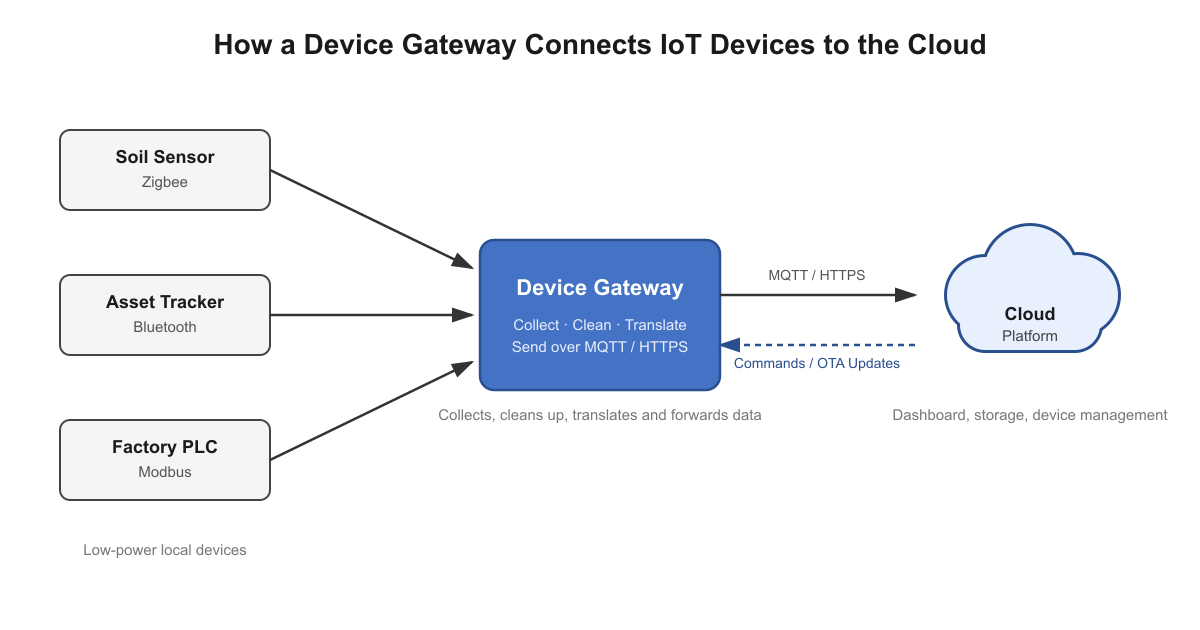
Most IoT devices are built to do one job well, and nothing else. A soil moisture sensor measures moisture. A pump controller switches a motor on and off. Neither is built to encrypt traffic, talk to a cloud platform, or juggle several different radio protocols at once. A device gateway takes on that work for them.
This guide covers what a device gateway is, how it works, the types you’ll run into, and what to check before you choose one. We’ll also cover a part most guides skip: once the gateway is installed at a remote site, how do you actually reach it from your desk?
- A device gateway sits between your IoT devices and a broader network, such as the internet. It collects their data, cleans it up, translates it into a protocol that your cloud server understands, and forwards it on.
- It also shields your devices, since the internet only ever talks to the gateway, never directly to a sensor.
- When choosing one, start with three questions: which protocols do your devices use, how many devices will you run, and how much security do you need?
- The gateway is also the one box you’ll need to reach remotely. If you can’t log in to it from your desk, every fix means a trip to the site - this guide covers how to do that without opening inbound ports on the site’s firewall.
What Is a Device Gateway in IoT?
A device gateway is a piece of hardware or software that sits between your IoT devices and a broader network, such as the internet. It collects data from the devices and forwards it to the cloud, a centralized server, or an app. It’s also commonly called an IoT gateway.
Think of it as a translator. Your sensors speak one language - Zigbee, Bluetooth, an industrial fieldbus - and the cloud speaks another, usually MQTT, CoAP or HTTP. The gateway sits in the middle: it receives what the sensors report, discards the readings nobody needs, repackages the rest in a protocol the cloud can use, and keeps the open internet from reaching your local equipment directly.
Take a farm with soil sensors in the field and a pump controller in a shed - nothing out there is connected to the internet on its own. A gateway in the barn collects what the sensors report, forwards it to a dashboard, and relays commands back to the pump. We’ll keep using this example through the rest of the guide.
Already Running Gateways in the Field?
Reach every one of them over SSH, VNC or RDP without opening a single inbound port. Try free for 30 days.
Why Do IoT Devices Need a Gateway?
Two reasons stand out: processing power, and protocol mismatch.
Processing Power
Most IoT sensors are built using cheap, low-end devices with limited resources, processing power and capacity, and that budget shapes everything else about them. A small, inexpensive chip doesn’t have the RAM or flash to hold a full TCP/IP stack or a TLS session, and it doesn’t have the electric power to spare for a Wi-Fi or cellular radio either - which matters even more once you factor in a battery-powered sensor that has to last months or years.
So the chip stays small and cheap, and the radio stays low-power: short messages over Bluetooth or Zigbee to a gateway nearby, instead of straight to the internet.
The gateway, in turn, just needs a bigger processor and a much larger energy budget than the sensor - usually mains power, but a solar-and-battery setup works the same way - and that’s what lets it run real compute, hold a TLS session, and power a Wi-Fi or cellular radio. That’s why, on our farm, the soil sensors only ever talk to the gateway in the barn, never to the internet directly.
Protocol Mismatch
Devices don’t all speak the same language. One sensor might use Zigbee, another Bluetooth, and a decades-old machine on the factory floor might run an industrial protocol like Modbus. A gateway translates all of them into a single outbound stream, so you don’t have to replace equipment that still works.
Even a smartphone can act as a basic gateway when it relays data from a nearby sensor over an app.
How Does a Device Gateway Work?
Picture a mixed setup: Zigbee sensors, a Bluetooth tracker, and an older machine running an industrial protocol. The gateway handles all of them in four steps:
- Collect. It receives readings from the devices nearby over their native radios or wired connections.
- Clean up. It drops repeated or useless readings, and can combine many into one summary - for example, one average per minute instead of sixty separate numbers.
- Translate. It wraps the data in a standard IoT protocol such as MQTT, CoAP or HTTP, so the cloud platform on the other end can parse and act on it.
- Send. It forwards the data to the cloud over Ethernet, Wi-Fi, cellular or satellite.
Data flows the other way too. A firmware update or a changed setting travels from the cloud, through the gateway, down to the device. This round-trip path is what makes remote device management possible, and it’s one of the core jobs of an IoT device management platform.
Where Does a Device Gateway Fit in IoT Architecture?
Zoom out, and an IoT system moves data through four stages: sensors collect it, a network carries it, a processing stage organizes it, and the cloud stores and analyzes it.
A gateway sits right at the boundary between the first two stages - it picks up what the sensors have already measured and carries it onward, so it’s mainly doing stage-two work. If the gateway is also powerful enough to clean and sort the data where it sits, it takes on stage three as well. A gateway that processes data this close to the devices is called an edge gateway.
Types of Device Gateways and When to Use Each
There are five common types, each suited to a different job:
- Cloud-based gateway - facilitates communication between your local devices and cloud-based platforms or IoT apps hosted in the cloud. A good fit when you want minimal equipment on site and need to scale quickly. SocketXP Cloud Gateway works this way for devices that already have IP connectivity, such as a Raspberry Pi or an industrial Linux box: the on-device agent handles connectivity, security and cloud integration, with no separate device gateway to run.
- Edge gateway - processes data close to the devices, cutting latency and bandwidth use. The right choice for latency-sensitive jobs like video feeds or locally-run AI models. Edge gateways usually have better processing power and hardware resources to run complex processing including AI models. An NVIDIA Jetson Orin Nano Super running a real-time object-detection model is a good example - it can flag a defect on a conveyor belt or spot an intruder in a camera feed the instant it happens, instead of streaming video to the cloud and waiting on an answer.
- Protocol gateway - translates the protocols spoken by older or industrial equipment so it can talk to modern systems. A Modbus-to-MQTT gateway bridging a decades-old PLC or power meter to a cloud dashboard is a common example - the PLC keeps speaking Modbus RTU, and the gateway handles the conversion.
- Security gateway - handles encryption and access control on behalf of simple devices that can’t protect themselves. A hub that terminates mutual TLS for a set of battery-powered Zigbee door locks and motion sensors is a good example - the locks don’t have the RAM or flash to run a TLS stack themselves, so the gateway does it on their behalf.
- Wearable gateway - connects personal devices like fitness trackers to a phone or a wider network. A phone relaying data from a Bluetooth heart-rate monitor or a continuous glucose monitor to its companion app is the everyday example.
Gateways are also described by how they connect, or by the environment they’re built for - these are separate, overlapping labels, not a sixth type. Cellular gateways work well at remote sites with no wired connection. LoRaWAN gateways pull data from low-power sensors spread over a wide area. Industrial gateways are ruggedized to survive dust, heat and vibration. Many gateways combine more than one of these traits.
Device Gateway Architecture: Hardware and Software
A gateway has two parts: the hardware you can touch, and the software that runs on it.
Hardware
On the hardware side, you’re looking at a processor, memory, local storage (an SD card or eMMC), and network ports or radios. What you need depends on the job: a small, low-power chip is plenty for relaying occasional temperature readings, but running local AI models or processing live video needs a far more capable processor.
Software Layers
The software is usually broken into layers, each handling one job, so the whole thing isn’t one giant program:
- Connectivity - receives messages from local devices over their native radios or wires, and checks them for errors or garbled data.
- Transport - moves data between the gateway and the cloud using standard internet transport protocols. TCP guarantees delivery; UDP is faster but doesn’t check.
- IoT protocol - wraps the message in a standard protocol, such as MQTT, CoAP or HTTP, that the cloud platform can parse and respond to.
- Security - handles encryption and decides who’s allowed to connect.
- Device management - handles remote configuration, health checks, and over-the-air updates.
- Cloud integration - links the gateway to your cloud platform or dashboard.
You don’t need to master all six. When comparing gateways, spend the most time on the last three - security, device management and cloud integration - since that’s where most of the implementation work, and risk, actually lives.
Benefits and Challenges of Using a Device Gateway
A gateway can cut costs and speed up your system. It’s also one more device you now have to look after - worth knowing upfront.
Key Benefits
- Lower costs. Only useful data goes to the cloud, so you pay less to send and store it.
- Faster response, where it applies. If the gateway processes data locally (an edge gateway), decisions happen on site instead of waiting on a round trip to the cloud. A purely cloud-based gateway doesn’t get this benefit, since the decision still waits on the cloud.
- Easier to scale. You can add more devices to an existing gateway without touching the cloud side.
- One entry point. All traffic funnels through one place instead of exposing hundreds of devices directly.
Common Challenges and How to Handle Them
- Data overload. Devices that stream readings nonstop can swamp your network. Filter and combine data at the gateway before sending it on.
- A single, valuable target. Because the gateway sits between your local equipment and the internet, attackers see it as worth going after first. We cover how to protect it in the security section below.
- Reaching it remotely. Once it’s out in the field, behind a router or a mobile connection, you can’t just connect to it from the office. Most guides leave this part out - we cover it next.
Device Gateway Use Cases: Real-World Examples in IoT
Gateways show up in almost every industry that uses IoT:
- Asset tracking - delivery vehicles report GPS location, battery health and mechanical status through an onboard gateway.
- Equipment monitoring - one gateway can read from a modern pump and a decades-old factory generator at the same time.
- Cold storage - when the temperature starts climbing, the gateway can act on it before the stock spoils.
- Remote access - technicians log in to the gateway over SSH or RDP from anywhere instead of driving to the site. If the gateway initiates the connection itself, no inbound ports need to be opened on the site firewall. We cover how that works in the next section, and our IoT remote access overview compares the main methods.
Healthcare, agriculture, smart homes and transport all use gateways the same way.
How to Remotely Access a Device Gateway Behind a Router or Firewall
Back to the farm: the gateway sits in the barn, behind a router or on a cellular connection. One day the data stops arriving. You want to log in, check the logs, and restart a service - but you can’t just connect to it.
Why You Can’t Reach a Gateway from Outside
The router in front of the gateway blocks any connection that starts from outside by default - that’s how NAT and stateful firewalls are supposed to work. Our guide to how NAT routers and firewalls secure devices behind them covers this in detail.
On mobile and satellite links it’s often worse. Carriers frequently share one public IP address across many customers - CGNAT - so port forwarding isn’t even an option, regardless of router access.
Why Port Forwarding and VPNs Don’t Work Well for Remote Gateways
Port forwarding opens a port on the site’s router so your traffic can get through - but that port is then open to the entire internet, and automated scanners will find it. It also needs a real public IP and admin access to the router, which you often don’t have at a customer’s site.
A VPN needs a server someone has to run and maintain, plus a client on every laptop that needs access, and it tends to grant access to the whole network rather than just the gateway. Our comparison of port forwarding, VPN and secure tunneling goes through the tradeoffs in more detail.
The remaining option - sending someone to the site every time something breaks - is slow and expensive.
How a Gateway Can Connect Out Instead
The alternative is to flip the direction: instead of you connecting in, the gateway connects out. A small agent on the gateway opens an outbound, encrypted connection to a cloud relay over the same port your browser uses for HTTPS (443) - traffic home routers and most office firewalls already allow by default.
When you want to log in, you connect to that same cloud relay, and it routes you through the connection the gateway already has open. From there you can check logs, restart a stuck service, or push a fix, the same as if you were standing next to it.
Setting This Up with SocketXP
This is how SocketXP works, and it covers two cases.
If you already have a gateway aggregating Zigbee, Bluetooth or industrial-protocol devices - like the barn gateway on our farm - you install the SocketXP agent directly on it, on any Linux box, and it shows up in the SocketXP portal. From there, you can open an SSH terminal in your browser, use VNC or RDP to reach a desktop, or expose a web dashboard running on the gateway. If you’d rather use your own SSH client, such as OpenSSH or PuTTY, you can run the agent in client mode on your laptop and connect through it instead. The full steps are in our SSH remote access guide.
If your devices already speak IP - a Raspberry Pi, an industrial PC, an edge AI box - SocketXP can be the cloud-based device gateway itself, not just the tunnel into one. The agent and the SocketXP cloud platform together cover the security, device management and cloud-integration layers described earlier: mTLS-authenticated connections, OTA firmware updates, remote command execution, health monitoring, and a fleet dashboard, all without a separate gateway appliance to provision or maintain.
Running More Than a Few Gateways
If you’re already running gateways in the field, this is where it pays off - you stop planning site visits for problems you can fix from a terminal, and you stop maintaining a VPN or a list of open ports per customer site. Many gateways also run an MQTT broker, and you can reach that the same way; see MQTT broker remote access. When you’re rolling out dozens of gateways, a single-touch install command sets up the agent on each one for you.
One thing worth planning for on cellular gateways: the agent keeps the tunnel alive with small, infrequent keepalive messages, which use a modest amount of mobile data. Check your agent’s configuration options if you need to tune that for a metered data plan.
How to Secure a Device Gateway in IoT: 5 Best Practices
Attackers tend to target gateways first, because the gateway sits between your local equipment and the internet - compromise it, and they may get a path into everything behind it. Five steps cover most of the risk:
- Lock down identity with certificates. Use mutual TLS so the gateway and the cloud can each verify the other is genuine, not just one side checking the other. SocketXP uses mutual TLS to authenticate the connection between the agent and the cloud.
- Protect your keys. Store private keys in a hardware security module or TPM, and enable secure boot so unauthorized software can’t run.
- Verify and encrypt. Authenticate devices before they connect, and encrypt all data in transit.
- Patch and isolate. Apply firmware updates promptly, keep gateways on a network segment separate from your core systems, and don’t leave inbound ports open for remote access - a connection the gateway initiates itself leaves nothing for scanners to find.
- Filter data early. The less raw, sensitive data you send across the wider network, the less you have to protect downstream.
For more, see our guide to zero trust security for IoT devices.
How to Choose the Right Device Gateway for Your IoT Project
Before shopping around, nail down a few fundamentals:
- Protocols. Which protocols do your devices use now? Which might you add later?
- Scale. How many devices do you have, and how much data does each send? If the count is heading into the hundreds, check how easily new units can be provisioned - for example, with zero-touch provisioning.
- Ready-made or custom. Ready-made gateways get you running faster. A custom one can fit your needs exactly, but takes longer and carries more integration risk.
- Certification. Many gateways already carry marks like FCC (US) or CE (Europe), which usually means less testing on your end. Check your region’s rules - the finished product may still need testing.
- Management. Look for remote monitoring and over-the-air updates - sending updates without a site visit. These save more time long-term than a slightly lower unit price. Also ask how you’ll log in to the gateway once it’s behind a customer’s router or a mobile network; if the answer is “open a port” or “set up a VPN,” budget for that extra work.
Conclusion
A device gateway makes IoT easier to run. Your devices stay small, cheap and simple, while the gateway takes on the data cleanup, the protocol translation, the security, and the connection to the cloud. It only delivers on that promise, though, if you can actually reach it once it’s deployed.
Before you choose one, check three things: which protocols your devices use, how many you’re running, and how much security you need. Then decide how you’ll get into the gateway after it’s installed - that question is easy to defer and expensive to answer late.
To see this working on a real device, take a look at SocketXP’s IoT remote access and device management platform - usable either as the tunnel into a gateway you already run, or as the cloud-based gateway itself. You can start with a free 30-day trial - all features included, no credit card required.
Frequently Asked Questions
Does every IoT device need a gateway?
No. A device with its own Wi-Fi or cellular radio, like a smart plug or an IP camera, can talk to the cloud on its own. You need a gateway when devices can't connect directly - low-power sensors on Zigbee, Bluetooth or LoRaWAN, battery-powered devices that can't stay online all the time, or older equipment that only speaks an industrial protocol. Even devices that can connect directly are sometimes put behind a gateway anyway, so only one box faces the internet instead of many.
What's the difference between an edge gateway and a cloud gateway?
The difference is where the data gets processed. An edge gateway filters data and makes decisions, like switching on a fan when a room overheats, right next to the devices, and sends only the useful data onward. A cloud-based gateway mostly forwards data as-is and lets the cloud platform do the processing. Edge gateways cut latency and bandwidth use; cloud gateways are simpler to set up and scale. Many deployments use both - an edge gateway for time-sensitive decisions, and the cloud for storage and reporting.
Should I choose a hardware gateway or a software gateway?
It depends on where it needs to sit and what it has to connect to. A hardware gateway is a dedicated box with built-in radios and ports - pick one for cellular, LoRaWAN or Zigbee connectivity, or for rough environments like a factory floor. A software gateway runs as a program on a computer or board you already have, such as a Raspberry Pi - it costs less and is easier to scale, which works well for testing or lighter deployments. Either kind still needs a plan for remote access once it's in the field.
Can a device gateway work without an internet connection?
Yes, for a while. Most gateways buffer readings locally and can keep running simple local rules while the connection is down. When the link comes back, the buffered data is sent to the cloud. The limit is local storage - once it fills up, the oldest data gets overwritten or new readings get dropped, depending on the gateway. If your site has an unreliable connection, local storage capacity matters more than raw processing power.
Does a device gateway replace a VPN for remote access?
Not necessarily, but it can remove the need for one. A traditional VPN needs a server, keys, and usually an inbound port opened on the site's firewall, and it often grants access to the whole network rather than just the gateway. An alternative is to have the gateway itself open an outbound connection to a cloud relay server - you then connect to that relay server and reach only the gateway, with no inbound firewall changes. Some security policies still mandate a VPN, so check your own requirements first.