
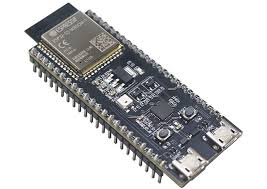
The ESP32 is one of the most widely deployed microcontrollers in IoT. Its dual-core Xtensa processor, built-in Wi-Fi and Bluetooth, and ESP-IDF framework with integrated mbedTLS make it fully capable of performing mutual TLS (mTLS) authentication — the protocol that requires both the device and the server to present and verify X.509 certificates before any data flows.
The practical challenge is not the mbedTLS configuration — it is certificate issuance. Building and running a private Certificate Authority to issue per-device certificates is significant infrastructure work that sits entirely outside the ESP32 application.
SocketXP solves this. The SocketXP agent installed on your development or provisioning machine (Linux) provides a CLI command that issues CA-signed X.509 certificates from the built-in PKI CA module in a single step. The ESP32 itself does not run the SocketXP agent — the agent runs on the machine where you build and provision firmware, and the resulting certificate files are embedded into the ESP32 binary.
For the full PKI architecture and certificate lifecycle model, see: Scaling mTLS IoT Security: The Developer’s Guide.
How Certificate Issuance Works for ESP32
The ESP32 runs FreeRTOS/ESP-IDF — there is no Linux userspace for the SocketXP agent binary to run in. The provisioning flow is:
Provisioning Machine (Linux, SocketXP agent installed)
        │
        │  socketxp ca login  --server "esp32-device001"
        │
        ▼
  /var/lib/socketxp/
    tls_server.crt   ← device certificate (PKI CA signed, serverAuth + clientAuth EKU)
    tls_server.key   ← device private key

        │
        │  copy to ESP-IDF project
        ▼
  myproject/main/certs/
    device_cert.pem  (= tls_server.crt)
    device_key.pem   (= tls_server.key)
    ca_cert.pem      (= PKI CA root)

        │
        │  idf.py build && idf.py flash
        ▼
  ESP32 firmware — certificates embedded in flash
  ESP32 connects to MQTT broker or HTTPS API using mTLS
The certificate issued with the --server flag has both serverAuth and clientAuth in its Extended Key Usage extension. This means the ESP32 can present it as a client credential when connecting to an MQTT broker or HTTPS server — the server accepts it because clientAuth is present. The certificate is long-lived, which is what an embedded device needs: no credential expires mid-deployment requiring a firmware reflash.
Prerequisites
- ESP32 development board (ESP32, ESP32-S2, ESP32-S3, ESP32-C3, or ESP32-C6)
- ESP-IDF v5.x installed and configured on your development machine
- SocketXP agent installed on your Linux development or provisioning machine (download)
- A valid SocketXP auth token (from the SocketXP portal)
Step 1: Issue the ESP32 Device Certificate on the Provisioning Machine
On your Linux development or provisioning machine (not on the ESP32), use the SocketXP agent CLI to issue a certificate for each ESP32 device from the PKI CA module:
sudo socketxp ca login--server "esp32-device001"
The name argument (esp32-device001) becomes the certificate’s Common Name (CN) — the device’s unique identity that the MQTT broker or HTTPS server sees during the mTLS handshake. Use a name that uniquely identifies the specific device: a serial number, MAC address, or hardware ID works well.
The command downloads two files to /var/lib/socketxp/ on the provisioning machine:
ls -la /var/lib/socketxp/tls_server.*
# tls_server.crt   ← ESP32 device certificate (signed by PKI CA)
# tls_server.key   ← ESP32 device private key
Confirm the certificate subject and validity:
openssl x509 -in /var/lib/socketxp/tls_server.crt -noout -subject -dates -ext extendedKeyUsage
# subject= /CN=esp32-device001
# notBefore= ...
# notAfter=  ...
# X509v3 Extended Key Usage:
#     TLS Web Server Authentication, TLS Web Client Authentication
The TLS Web Client Authentication OID in the EKU is what allows the ESP32 to present this certificate as a client credential to the MQTT broker or HTTPS server.
Step 2: Extract the PKI CA Root Certificate
The ESP32 needs the PKI CA root certificate to verify the server’s certificate during the mTLS handshake. Extract it from the downloaded chain:
# tls_server.crt may contain the full chain (leaf cert + CA cert).
# Split the chain to extract the CA certificate separately:
awk 'BEGIN{n=0} /-----BEGIN CERTIFICATE-----/{n++} {print > "/tmp/cert-" n ".pem"}' \
    /var/lib/socketxp/tls_server.crt

# cert-1.pem = ESP32 device certificate (leaf)
# cert-2.pem = PKI CA root certificate

# Verify the split:
openssl x509 -in /tmp/cert-2.pem -noout -subject
# subject= /CN=PKI CA  (or similar)
Refer to the SocketXP documentation for the direct CA certificate download procedure if it is not bundled in the chain.
Step 3: Copy Certificates into the ESP-IDF Project
Create a certs/ directory inside your ESP-IDF project’s main/ folder and copy the three credential files:
mkdir -p ~/esp/my_project/main/certs

# Device certificate and private key (from socketxp ca login --server)
cp /var/lib/socketxp/tls_server.crt ~/esp/my_project/main/certs/device_cert.pem
cp /var/lib/socketxp/tls_server.key ~/esp/my_project/main/certs/device_key.pem

# PKI CA root certificate (to verify the server's certificate)
cp /tmp/cert-2.pem ~/esp/my_project/main/certs/ca_cert.pem
Verify all three are present and well-formed:
# Device cert — must verify against the CA cert
openssl verify -CAfile ~/esp/my_project/main/certs/ca_cert.pem \
               ~/esp/my_project/main/certs/device_cert.pem
# device_cert.pem: OK

# Key must match the certificate's public key
openssl x509 -noout -modulus -in ~/esp/my_project/main/certs/device_cert.pem | md5sum
openssl rsa  -noout -modulus -in ~/esp/my_project/main/certs/device_key.pem  | md5sum
# Both md5sums must be identical — confirms the key pair matches
Step 4: Embed Certificates in ESP-IDF Firmware
ESP-IDF compiles certificate files directly into the firmware binary using the EMBED_TXTFILES directive. The files are accessible in C code via auto-generated linker symbols — no filesystem or NVS access needed at runtime.
In main/CMakeLists.txt:
idf_component_register(
    SRCS "main.c"
    INCLUDE_DIRS "."
    EMBED_TXTFILES
        "certs/ca_cert.pem"
        "certs/device_cert.pem"
        "certs/device_key.pem"
)
Declare the symbols in main.c:
// Symbols generated by ESP-IDF for each embedded file
extern const uint8_t ca_cert_pem_start[]     asm("_binary_ca_cert_pem_start");
extern const uint8_t ca_cert_pem_end[]       asm("_binary_ca_cert_pem_end");
extern const uint8_t device_cert_pem_start[] asm("_binary_device_cert_pem_start");
extern const uint8_t device_cert_pem_end[]   asm("_binary_device_cert_pem_end");
extern const uint8_t device_key_pem_start[]  asm("_binary_device_key_pem_start");
extern const uint8_t device_key_pem_end[]    asm("_binary_device_key_pem_end");
Step 5: Configure mbedTLS for mTLS in ESP-IDF
ESP-IDF’s esp_tls component wraps mbedTLS. Pass the certificate buffers through esp_tls_cfg_t:
#include "esp_tls.h"
#include "esp_log.h"

static const char *TAG = "mtls_esp32";

void perform_mtls_https_request(void)
{
    esp_tls_cfg_t cfg = {
        // CA cert: verify the server (MQTT broker or HTTPS endpoint) is trusted
        .cacert_buf   = ca_cert_pem_start,
        .cacert_bytes = ca_cert_pem_end - ca_cert_pem_start,

        // Device cert + key: authenticate the ESP32 as a known device
        // tls_server.crt issued by socketxp ca login --server has clientAuth EKU
        // so the server accepts it as a valid client credential
        .clientcert_buf   = device_cert_pem_start,
        .clientcert_bytes = device_cert_pem_end - device_cert_pem_start,
        .clientkey_buf    = device_key_pem_start,
        .clientkey_bytes  = device_key_pem_end  - device_key_pem_start,
    };

    esp_tls_t *tls = esp_tls_conn_http_new("https://api.example.com/data", &cfg);
    if (tls == NULL) {
        ESP_LOGE(TAG, "mTLS connection failed — verify certs match the server's trusted CA");
        return;
    }

    ESP_LOGI(TAG, "mTLS handshake successful — ESP32 authenticated as esp32-device001");

    const char *request = "GET /data HTTP/1.1\r\nHost: api.example.com\r\nConnection: close\r\n\r\n";
    size_t written = 0, req_len = strlen(request);
    while (written < req_len) {
        int ret = esp_tls_conn_write(tls, request + written, req_len - written);
        if (ret <= 0) { ESP_LOGE(TAG, "Write error: %d", ret); break; }
        written += ret;
    }

    char buf[512];
    int bytes_read;
    do {
        bytes_read = esp_tls_conn_read(tls, buf, sizeof(buf) - 1);
        if (bytes_read > 0) { buf[bytes_read] = 0; ESP_LOGI(TAG, "%s", buf); }
    } while (bytes_read > 0);

    esp_tls_conn_destroy(tls);
}
Step 6: mTLS with MQTT on ESP32
For ESP32 devices publishing sensor data to a Mosquitto broker configured with SocketXP-issued certificates (see MQTT mTLS Authentication Setup), the same device_cert.pem and device_key.pem files authenticate the device to the broker:
#include "mqtt_client.h"

void start_mtls_mqtt(void)
{
    esp_mqtt_client_config_t cfg = {
        .broker = {
            .address.uri = "mqtts://mqtt-broker.local:8883",
            .verification = {
                // Verify the broker's certificate against PKI CA root
                .certificate     = (const char *)ca_cert_pem_start,
                .certificate_len = ca_cert_pem_end - ca_cert_pem_start,
            }
        },
        .credentials = {
            .authentication = {
                // Device credential: socketxp ca login --server cert (clientAuth EKU present)
                .certificate     = (const char *)device_cert_pem_start,
                .certificate_len = device_cert_pem_end - device_cert_pem_start,
                .key             = (const char *)device_key_pem_start,
                .key_len         = device_key_pem_end  - device_key_pem_start,
            }
        }
    };

    esp_mqtt_client_handle_t client = esp_mqtt_client_init(&cfg);
    esp_mqtt_client_register_event(client, ESP_EVENT_ANY_ID, mqtt_event_handler, NULL);
    esp_mqtt_client_start(client);
}
Because the Mosquitto broker is configured with cafile /etc/mosquitto/certs/socketxp-ca.crt (the same PKI CA root that signed device_cert.pem), the broker accepts the ESP32’s certificate automatically — with no per-device broker configuration change required.
Step 7: Enable Required mbedTLS Configuration
Verify your project’s sdkconfig includes mTLS support:
# Component config → mbedTLS
CONFIG_MBEDTLS_TLS_CLIENT=y
CONFIG_MBEDTLS_X509_CRT_PARSE_C=y
CONFIG_MBEDTLS_ECP_C=y                # ECC — smaller keys, faster handshake
CONFIG_MBEDTLS_ECP_DP_SECP256R1_ENABLED=y
CONFIG_MBEDTLS_ECDSA_C=y
CONFIG_MBEDTLS_ECDH_C=y
CONFIG_MBEDTLS_RSA_C=y                # Only if using RSA certs
CONFIG_MBEDTLS_X509_CRL_PARSE_C=y    # CRL revocation checking
For constrained ESP32 variants (ESP32-C3, 400KB SRAM), prefer ECC P-256 certificates. ECC private keys are 32 bytes versus 256 bytes for RSA-2048, and the TLS handshake is significantly faster on a microcontroller CPU.
Fleet Provisioning: Issuing a Unique Certificate Per Device
For a fleet of ESP32 devices, each device needs its own unique certificate so the server can distinguish between them and revoke individual devices without affecting others. Run socketxp ca login --server once per device on the provisioning machine, with a device-unique name:
#!/bin/bash
# provision_esp32_fleet.sh
# Run on the Linux provisioning machine, once per device

AUTH_TOKEN=""
DEVICE_SERIAL="$1"        # e.g., "esp32-ABC123"
OUTPUT_DIR="$2"           # e.g., "/certs/esp32-ABC123/"

mkdir -p "${OUTPUT_DIR}"

# Issue a unique certificate for this device from PKI CA
sudo socketxp ca login "${AUTH_TOKEN}" --server "${DEVICE_SERIAL}"

if [ $? -ne 0 ]; then
    echo "Certificate issuance failed for ${DEVICE_SERIAL}"
    exit 1
fi

# Copy to the per-device output directory
cp /var/lib/socketxp/tls_server.crt "${OUTPUT_DIR}/device_cert.pem"
cp /var/lib/socketxp/tls_server.key "${OUTPUT_DIR}/device_key.pem"

# Extract and copy the CA cert (same for all devices)
awk 'BEGIN{n=0} /-----BEGIN CERTIFICATE-----/{n++} {print > "/tmp/cert-" n ".pem"}' \
    /var/lib/socketxp/tls_server.crt
cp /tmp/cert-2.pem "${OUTPUT_DIR}/ca_cert.pem"

echo "Certs ready for ${DEVICE_SERIAL} in ${OUTPUT_DIR}"
For each device serial, the script issues a unique certificate, storing the three files in a per-device directory. The ESP-IDF build for each device pulls from that directory, embedding unique credentials in each firmware binary.
On-Device Self-Provisioning via the SocketXP CA API
When a provisioning machine is not part of your manufacturing workflow — for example, devices that self-register over Wi-Fi on first boot in the field — the ESP32 can call the SocketXP CA API directly over HTTPS to request its own certificate. This requires no prior certificate embedded in firmware and no separate provisioning step on a Linux machine.
How It Works
On first boot, the ESP32:
- Connects to Wi-Fi and syncs time via SNTP
- Checks NVS — if no certificate is stored, triggers provisioning
- POSTs an authenticated JSON request to the SocketXP CA API
- Receives a signed
tls_server.crt,tls_server.key, and PKI CA root certificate in the response - Stores all three in NVS
- Uses the certificate for all subsequent mTLS connections
On every subsequent boot, the device loads its certificate from NVS. A FreeRTOS task running in the background monitors expiry and automatically renews when 30% of validity remains — mirroring exactly what the SocketXP agent does on Linux devices.
Provisioning the Auth Token
The auth token must reach the device without being compiled into firmware (which would make it identical across all devices and unrevocable per-device). Two safe approaches:
- Factory NVS flash: Write the auth token into the NVS partition using
nvs_flash_inittooling during factory test before the device ships - Secure first-boot Wi-Fi provisioning: Use ESP-IDF’s Wi-Fi Provisioning Manager (BLE or SoftAP) to have the installer app send both Wi-Fi credentials and the auth token to the device on first setup
Either way, the device reads the auth token from NVS at runtime — never from firmware flash.
ESP-IDF Component: socketxp_provision
Create components/socketxp_provision/socketxp_provision.h:
#pragma once #include#include "esp_err.h" #define SXP_CA_API_SERVER "https://api.socketxp.com/v1/certificate/server" #define SXP_CA_API_CLIENT "https://api.socketxp.com/v1/certificate/client" #define SXP_NVS_NAMESPACE "sxp_certs" #define SXP_CERT_BUF_SIZE 4096 /* PEM cert max size */ #define SXP_KEY_BUF_SIZE 2048 /* PEM key max size */ /* Certificate bundle returned by the CA API */ typedef struct { char certificate[SXP_CERT_BUF_SIZE]; /* device tls_server.crt (PEM) */ char private_key[SXP_KEY_BUF_SIZE]; /* device tls_server.key (PEM) */ char ca_certificate[SXP_CERT_BUF_SIZE]; /* PKI CA root (PEM) */ char expires_at[32]; /* ISO-8601: "2027-01-28T00:00:00Z" */ } sxp_cert_bundle_t; esp_err_t sxp_provision_server_cert(const char *auth_token, const char *device_name, sxp_cert_bundle_t *out); esp_err_t sxp_provision_client_cert(const char *auth_token, const char *email, sxp_cert_bundle_t *out); esp_err_t sxp_certs_save_to_nvs(const sxp_cert_bundle_t *bundle); esp_err_t sxp_certs_load_from_nvs(sxp_cert_bundle_t *bundle); bool sxp_certs_exist_in_nvs(void); bool sxp_cert_needs_renewal(const char *expires_at); void sxp_renewal_task_start(const char *auth_token, const char *device_name);
Create components/socketxp_provision/socketxp_provision.c:
#include "socketxp_provision.h" #include "esp_http_client.h" #include "esp_log.h" #include "cJSON.h" #include "nvs_flash.h" #include "nvs.h" #include "freertos/FreeRTOS.h" #include "freertos/task.h" #include "freertos/timers.h" #include#include static const char *TAG = "sxp_provision"; /* Buffer for accumulating the HTTP response body */ typedef struct { char *buf; size_t len; size_t cap; } http_resp_t; static esp_err_t http_event_handler(esp_http_client_event_t *evt) { http_resp_t *resp = (http_resp_t *)evt->user_data; if (evt->event_id == HTTP_EVENT_ON_DATA && resp) { size_t copy = evt->data_len; if (resp->len + copy >= resp->cap) copy = resp->cap - resp->len - 1; memcpy(resp->buf + resp->len, evt->data, copy); resp->len += copy; resp->buf[resp->len] = '\0'; } return ESP_OK; } /* ── Internal: POST JSON to a CA endpoint and parse the response ── */ static esp_err_t ca_api_request(const char *url, const char *auth_token, const char *body, sxp_cert_bundle_t *out) { static char resp_buf[8192]; /* large enough for cert + key + ca PEM in JSON */ http_resp_t resp = { .buf = resp_buf, .len = 0, .cap = sizeof(resp_buf) }; memset(resp_buf, 0, sizeof(resp_buf)); esp_http_client_config_t cfg = { .url = url, .method = HTTP_METHOD_POST, .event_handler = http_event_handler, .user_data = &resp, /* api.socketxp.com uses a publicly trusted TLS certificate; ESP-IDF's built-in certificate bundle verifies it automatically. */ .crt_bundle_attach = esp_crt_bundle_attach, .timeout_ms = 10000, }; esp_http_client_handle_t client = esp_http_client_init(&cfg); /* Auth token sent as a Bearer token in the Authorization header */ char auth_header[160]; snprintf(auth_header, sizeof(auth_header), "Bearer %s", auth_token); esp_http_client_set_header(client, "Authorization", auth_header); esp_http_client_set_header(client, "Content-Type", "application/json"); esp_http_client_set_post_field(client, body, strlen(body)); esp_err_t err = esp_http_client_perform(client); int status = esp_http_client_get_status_code(client); esp_http_client_cleanup(client); if (err != ESP_OK || status != 200) { ESP_LOGE(TAG, "CA API request failed: err=%d status=%d", err, status); return ESP_FAIL; } /* Parse JSON response */ cJSON *root = cJSON_Parse(resp_buf); if (!root) { ESP_LOGE(TAG, "JSON parse error"); return ESP_FAIL; } cJSON *cert = cJSON_GetObjectItem(root, "certificate"); cJSON *key = cJSON_GetObjectItem(root, "private_key"); cJSON *ca = cJSON_GetObjectItem(root, "ca_certificate"); cJSON *expiry = cJSON_GetObjectItem(root, "expires_at"); if (!cert || !key || !ca || !expiry) { ESP_LOGE(TAG, "Missing fields in CA API response"); cJSON_Delete(root); return ESP_FAIL; } strlcpy(out->certificate, cert->valuestring, SXP_CERT_BUF_SIZE); strlcpy(out->private_key, key->valuestring, SXP_KEY_BUF_SIZE); strlcpy(out->ca_certificate, ca->valuestring, SXP_CERT_BUF_SIZE); strlcpy(out->expires_at, expiry->valuestring, sizeof(out->expires_at)); cJSON_Delete(root); ESP_LOGI(TAG, "CA API: certificate issued, expires %s", out->expires_at); return ESP_OK; } /* ── Public: request a --server type certificate ── */ esp_err_t sxp_provision_server_cert(const char *auth_token, const char *device_name, sxp_cert_bundle_t *out) { /* auth_token goes in the Authorization: Bearer header (set in ca_api_request). The JSON body carries only the device identity parameters. */ char body[128]; snprintf(body, sizeof(body), "{\"device_name\":\"%s\"}", device_name); return ca_api_request(SXP_CA_API_SERVER, auth_token, body, out); } /* ── Public: request a --client type certificate (24 h, human operators) ── */ esp_err_t sxp_provision_client_cert(const char *auth_token, const char *email, sxp_cert_bundle_t *out) { char body[128]; snprintf(body, sizeof(body), "{\"email\":\"%s\"}", email); return ca_api_request(SXP_CA_API_CLIENT, auth_token, body, out); } /* ── NVS helpers ── */ esp_err_t sxp_certs_save_to_nvs(const sxp_cert_bundle_t *b) { nvs_handle_t h; ESP_ERROR_CHECK(nvs_open(SXP_NVS_NAMESPACE, NVS_READWRITE, &h)); nvs_set_blob(h, "device_cert", b->certificate, strlen(b->certificate) + 1); nvs_set_blob(h, "device_key", b->private_key, strlen(b->private_key) + 1); nvs_set_blob(h, "ca_cert", b->ca_certificate, strlen(b->ca_certificate) + 1); nvs_set_str (h, "expires_at", b->expires_at); esp_err_t err = nvs_commit(h); nvs_close(h); ESP_LOGI(TAG, "Certificates saved to NVS"); return err; } esp_err_t sxp_certs_load_from_nvs(sxp_cert_bundle_t *b) { nvs_handle_t h; if (nvs_open(SXP_NVS_NAMESPACE, NVS_READONLY, &h) != ESP_OK) return ESP_FAIL; size_t len; len = SXP_CERT_BUF_SIZE; nvs_get_blob(h, "device_cert", b->certificate, &len); len = SXP_KEY_BUF_SIZE; nvs_get_blob(h, "device_key", b->private_key, &len); len = SXP_CERT_BUF_SIZE; nvs_get_blob(h, "ca_cert", b->ca_certificate, &len); len = sizeof(b->expires_at); nvs_get_str(h, "expires_at", b->expires_at, &len); nvs_close(h); ESP_LOGI(TAG, "Certificates loaded from NVS (expires %s)", b->expires_at); return ESP_OK; } bool sxp_certs_exist_in_nvs(void) { nvs_handle_t h; if (nvs_open(SXP_NVS_NAMESPACE, NVS_READONLY, &h) != ESP_OK) return false; size_t len = 0; bool exists = (nvs_get_blob(h, "device_cert", NULL, &len) == ESP_OK && len > 0); nvs_close(h); return exists; } /* ── Renewal check: true when ≤ 30% of the cert lifetime remains ── */ bool sxp_cert_needs_renewal(const char *expires_at) { /* Parse "YYYY-MM-DDTHH:MM:SSZ" */ struct tm tm = {0}; if (strptime(expires_at, "%Y-%m-%dT%H:%M:%SZ", &tm) == NULL) return false; time_t expiry_epoch = mktime(&tm); time_t now = time(NULL); if (now >= expiry_epoch) return true; /* already expired */ /* We need the issuance time to compute 30%. Approximate: load it from NVS if stored, or use a fixed validity period. Here we use a simpler heuristic: renew if < 30 days remain for a 90-day cert. For production, store issued_at in NVS alongside expires_at. */ double days_left = difftime(expiry_epoch, now) / 86400.0; ESP_LOGI(TAG, "Certificate expires in %.1f days", days_left); return (days_left < 27.0); /* 30% of 90 days = 27 days */ } /* ── Background FreeRTOS task: checks daily, renews when needed ── */ typedef struct { char auth_token[128]; char device_name[64]; } renewal_ctx_t; static void renewal_task(void *arg) { renewal_ctx_t *ctx = (renewal_ctx_t *)arg; for (;;) { /* Check once every 24 hours */ vTaskDelay(pdMS_TO_TICKS(24UL * 60 * 60 * 1000)); sxp_cert_bundle_t bundle; if (sxp_certs_load_from_nvs(&bundle) != ESP_OK) continue; if (!sxp_cert_needs_renewal(bundle.expires_at)) continue; ESP_LOGI(TAG, "30%% validity threshold reached — renewing certificate"); sxp_cert_bundle_t fresh = {0}; if (sxp_provision_server_cert(ctx->auth_token, ctx->device_name, &fresh) == ESP_OK) { sxp_certs_save_to_nvs(&fresh); ESP_LOGI(TAG, "Certificate renewed automatically"); /* Signal the MQTT/HTTPS connection layer to reconnect with the new certificate on next connection. Implementation depends on your application's connection manager. */ } else { ESP_LOGW(TAG, "Renewal attempt failed — will retry in 24 hours"); } } } void sxp_renewal_task_start(const char *auth_token, const char *device_name) { static renewal_ctx_t ctx; strlcpy(ctx.auth_token, auth_token, sizeof(ctx.auth_token)); strlcpy(ctx.device_name, device_name, sizeof(ctx.device_name)); xTaskCreate(renewal_task, "sxp_renew", 6144, &ctx, 2, NULL); ESP_LOGI(TAG, "Certificate renewal task started"); }
Boot Sequence: Provision on First Boot, Load on Subsequent Boots
In main.c, call the provisioning component after Wi-Fi is connected and SNTP has synchronised the system clock:
#include "socketxp_provision.h"
#include "nvs_flash.h"

/* Global cert bundle — used by mTLS connections throughout the app */
static sxp_cert_bundle_t g_certs;

void app_main(void)
{
    /* 1. Initialise NVS */
    esp_err_t ret = nvs_flash_init();
    if (ret == ESP_ERR_NVS_NO_FREE_PAGES || ret == ESP_ERR_NVS_NEW_VERSION_FOUND) {
        nvs_flash_erase();
        nvs_flash_init();
    }

    /* 2. Connect to Wi-Fi (your implementation) */
    wifi_connect();

    /* 3. Synchronise system clock via SNTP — required for cert expiry checks */
    sntp_setoperatingmode(SNTP_OPMODE_POLL);
    sntp_setservername(0, "pool.ntp.org");
    sntp_init();
    /* Wait until time is set */
    time_t now = 0;
    while (now < 1700000000) { vTaskDelay(pdMS_TO_TICKS(500)); time(&now); }

    /* 4. Read the auth token stored in NVS during factory provisioning */
    char auth_token[128] = {0};
    nvs_handle_t h;
    nvs_open("factory", NVS_READONLY, &h);
    size_t len = sizeof(auth_token);
    nvs_get_str(h, "auth_token", auth_token, &len);
    nvs_close(h);

    /* Derive a unique device name from the MAC address */
    uint8_t mac[6]; esp_read_mac(mac, ESP_MAC_WIFI_STA);
    char device_name[32];
    snprintf(device_name, sizeof(device_name),
             "esp32-%02x%02x%02x%02x%02x%02x",
             mac[0], mac[1], mac[2], mac[3], mac[4], mac[5]);

    /* 5. First boot: request certificate from SocketXP CA API */
    if (!sxp_certs_exist_in_nvs()) {
        ESP_LOGI("main", "No certificate in NVS — provisioning from CA API");
        if (sxp_provision_server_cert(auth_token, device_name, &g_certs) == ESP_OK) {
            sxp_certs_save_to_nvs(&g_certs);
        } else {
            ESP_LOGE("main", "Provisioning failed — cannot proceed without a certificate");
            esp_restart();
        }
    } else {
        /* Subsequent boots: load from NVS */
        sxp_certs_load_from_nvs(&g_certs);
    }

    /* 6. Start the background renewal task */
    sxp_renewal_task_start(auth_token, device_name);

    /* 7. Start MQTT or HTTPS using g_certs.certificate, g_certs.private_key,
          g_certs.ca_certificate (loaded from NVS on every boot)             */
    start_mtls_mqtt_with_bundle(&g_certs);
}
Using the NVS Certificate in an mTLS Connection
After loading, the PEM strings in g_certs are passed directly to esp_tls_cfg_t or esp_mqtt_client_config_t:
void start_mtls_mqtt_with_bundle(const sxp_cert_bundle_t *certs)
{
    esp_mqtt_client_config_t cfg = {
        .broker = {
            .address.uri = "mqtts://mqtt-broker.local:8883",
            .verification = {
                .certificate     = certs->ca_certificate,
                .certificate_len = strlen(certs->ca_certificate) + 1,
            }
        },
        .credentials = {
            .authentication = {
                /* tls_server.crt issued by socketxp ca login --server:
                   long-lived, clientAuth EKU present — accepted as
                   client credential by the Mosquitto broker            */
                .certificate     = certs->certificate,
                .certificate_len = strlen(certs->certificate) + 1,
                .key             = certs->private_key,
                .key_len         = strlen(certs->private_key) + 1,
            }
        }
    };
    esp_mqtt_client_handle_t client = esp_mqtt_client_init(&cfg);
    esp_mqtt_client_start(client);
}
Memory Budget
The self-provisioning component adds the following to the ESP32 RAM budget:
| Item | Heap usage |
|---|---|
g_certs struct (cert + key + CA PEM) | ~9 KB |
HTTP response buffer (in ca_api_request) | ~8 KB (stack or heap, freed after use) |
| cJSON parse tree during provisioning | ~3 KB (freed after use) |
| Renewal FreeRTOS task stack | 6 KB |
Peak RAM during provisioning (first boot only): ~20 KB. After provisioning completes, the http_resp_t buffer and cJSON tree are freed, leaving only the g_certs struct and the renewal task stack resident. On an ESP32 with 520 KB SRAM this is comfortable; on the ESP32-C3 (400 KB) keep the response buffer on the stack rather than heap to avoid fragmentation.
Certificate Renewal for Embedded ESP32 Credentials
The renewal strategy depends on which provisioning approach you used.
If you used the provisioning machine approach (Steps 1–7): the certificate is compiled into firmware. Renewal means rebuilding and OTA-flashing new firmware with a fresh device_cert.pem obtained via socketxp ca login --server on the provisioning machine. Use long-lived certificates so renewal aligns with normal firmware release cycles.
If you used the on-device self-provisioning approach (previous section): renewal is fully automatic. The sxp_renewal_task running in the background calls sxp_cert_needs_renewal() every 24 hours. When 30% of validity remains, it calls sxp_provision_server_cert() to request a fresh certificate from the SocketXP CA API, saves it to NVS, and the next MQTT/HTTPS reconnect uses the new certificate — no firmware update, no operator action, no OTA required. This mirrors exactly what the SocketXP agent does on Linux devices.
Security Considerations for ESP32 Private Keys
The private key (device_key.pem / tls_server.key) must be protected in the ESP32 firmware. Two mechanisms are available without additional hardware:
Flash Encryption: Enable ESP32 Flash Encryption to encrypt all flash contents with a device-unique key burned into the eFuse block at provisioning time. The private key stored in firmware or NVS is encrypted at rest — an attacker who reads the flash chip gets only ciphertext.
Secure Boot V2: Ensure only signed firmware executes on the device. Prevents an attacker from reflashing the device with modified firmware that extracts the private key at runtime.
For highest security, pair an ESP32 with an ATECC608B Secure Element connected via I²C. The private key is generated inside the ATECC608B’s tamper-resistant hardware and never exported. The ESP32 delegates signing operations to the Secure Element through mbedTLS’s PKCS#11 interface.
See Hardware Security Modules and mTLS for IoT for the complete integration.
Next Steps
- Scaling mTLS IoT Security: The Complete Developer Guide — full PKI architecture, SCEP/CRL/OCSP, and BastionXP as alternate CA
- MQTT mTLS Authentication Setup — configuring Mosquitto with SocketXP-issued certificates so ESP32 devices connect with
device_cert.pem - Lightweight mTLS for Constrained IoT Devices — mbedTLS footprint optimization for ESP32 variants with limited RAM