
How to Remotely Access 10,000 IoT Devices
Remotely accessing 10,000 IoT devices is not a scaling problem — it is an architecture problem. The approach that works for 10 devices does not work for 10,000. And the approach that works for 10,000 is fundamentally different from what most engineers reach for first.
This guide covers the architecture, security model, and operational workflows required to manage a fleet of 10,000+ IoT devices — and walks through how SocketXP IoT Device Management Platform is built to solve exactly this problem.
1. Why Remote Access Breaks at Scale
When you have a handful of devices, you can get away with ad-hoc approaches: a VPN server on each site, port-forwarding rules on customer routers, or a jump host you manually maintain. As your fleet grows past a few hundred devices, every one of those approaches breaks in a predictable way.
1.1 Why VPNs Don’t Scale for IoT
VPNs were designed for people connecting to corporate networks — not for thousands of geographically dispersed embedded devices.
- Client-per-device overhead: Managing VPN certificates and configurations for 10,000 devices is an operations nightmare. Revocation, rotation, and re-enrollment consume engineering time that compounds with every device added.
- Not deployable at customer sites: Your devices are deployed in your customers’ offices, factories, and fields. You have no control over their router or firewall. You cannot install a VPN gateway in every customer location.
- Single point of failure: A central VPN gateway becomes a chokepoint. Any degradation affects your entire fleet simultaneously.
- Cellular/satellite incompatibility: Devices on 4G, 5G, or Starlink sit behind CGNAT — multiple devices share a single public IP. Traditional VPNs cannot reach them at all.
For a full breakdown, see our guide on replacing VPNs with secure tunneling for IoT.
1.2 Why Port Forwarding Doesn’t Work
Port forwarding requires a public IP, control over the router, and an open inbound port on the device. All three are typically absent in production IoT deployments:
- Customer routers are outside your control
- ISPs increasingly use CGNAT, removing public IP access
- Open inbound ports are a direct security liability
See our article on remote access without VPN or port forwarding for details.
1.3 Why SSH Key Management Breaks at 10,000 Devices
SSH key management is workable for small teams. At scale:
- A separate key pair per device means 10,000 private keys to secure, rotate, and audit
- Shared keys violate the principle of least privilege and create catastrophic blast radius if compromised
- No built-in mechanism for time-limited access, per-user permissions, or session recording
The correct answer at scale is certificate-based authentication with a centralized PKI — short-lived certificates issued on demand rather than long-lived static keys distributed to every device.
2. The Right Architecture: Outbound Reverse Tunnels
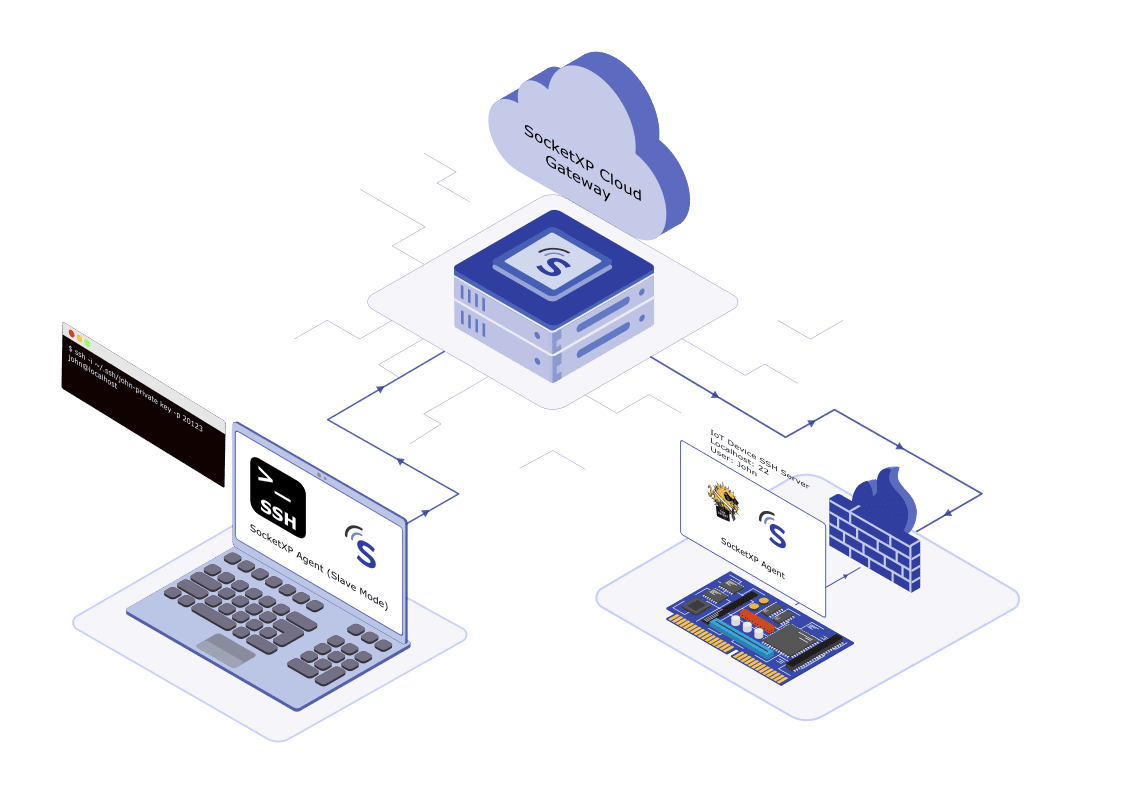
The architectural pattern that actually works at IoT scale is the outbound reverse tunnel. Here is how it works:
- A lightweight agent installed on each IoT device establishes a persistent, outbound SSL/TLS connection to a cloud relay.
- The connection is initiated by the device, so no inbound ports are opened, no router configuration is needed, and the device works behind any NAT or firewall.
- When an engineer needs to access a device, the connection is routed through the relay to the device’s agent — over the already-established outbound tunnel.
- The device is never exposed directly to the internet.
This is the architecture SocketXP uses. Every device runs the SocketXP agent, which creates an encrypted outbound tunnel to the SocketXP Cloud Gateway. Through that tunnel, engineers can reach the device over SSH, HTTPS, VNC, RDP, or MQTT — from anywhere, with no router changes, no VPN, and no exposed ports.
2.1 What Networks It Works With
Because the tunnel is outbound-initiated, SocketXP works on every network type your devices will encounter in the field:
- WiFi and Ethernet (standard enterprise and home networks)
- 4G LTE and 5G cellular (devices behind CGNAT with no public IP)
- Starlink and other satellite internet (high-latency, shared IP)
- Corporate firewalls and OT networks (factory and industrial environments)
For devices deployed on cellular or satellite networks, see our guide on remote access for IoT behind 4G, 5G, and Starlink.
3. Remote Access Protocols at Scale
Different use cases require different protocols. A production IoT platform needs to support all of them — not just HTTP tunneling.
3.1 SSH: Debugging, Configuration, and Shell Access
SSH is the primary protocol for accessing the terminal of an embedded Linux device. SocketXP tunnels SSH sessions through its agent, giving engineers a full terminal to any device in the fleet — from a browser or any standard SSH client.
Use SSH to: debug running processes, inspect logs, modify configuration files, and run one-off commands. See our IoT SSH remote access guide for setup details.
3.2 HTTPS: Web Applications and Local APIs
Many IoT devices run a local web application, REST API, or configuration UI. SocketXP tunnels HTTPS traffic so engineers can reach the device’s web interface from any browser, securely.
See our guide on Accessing IoT web applications remotely.
3.3 VNC and RDP: Graphical Desktop Access
Devices running a GUI desktop — industrial panels, kiosks, or development boards — can be accessed remotely using VNC or RDP through SocketXP’s tunnels. No separate VNC server configuration is required beyond the standard desktop setup.
Guides: Remote VNC access for IoT | Remote RDP access for IoT
3.4 MQTT: Sensor Data and Messaging
For IoT devices using MQTT for telemetry and messaging, SocketXP provides tunneling support for MQTT brokers, enabling remote connection to MQTT-based data pipelines without exposing the broker publicly.
4. Provisioning 10,000 Devices Without Manual Configuration
Manually provisioning 10,000 devices — physically connecting to each one to load credentials, configure network settings, and install the agent — is completely infeasible. It takes weeks of technician time and introduces human error at every step.
The solution is Zero-Touch Provisioning (ZTP).
4.1 How Zero-Touch Provisioning Works with SocketXP
SocketXP supports factory token-based zero-touch provisioning:
- During manufacturing, each device is pre-loaded with a SocketXP authentication token.
- When the device is powered on for the first time at its deployment location, the SocketXP agent automatically connects to the SocketXP Cloud Gateway using the pre-loaded token.
- The control plane authenticates the device, issues a unique X.509 certificate, and registers the device in your fleet inventory.
- The device appears in your SocketXP dashboard — provisioned, authenticated, and ready — with no human intervention at the site.
This process scales horizontally. Whether you ship 100 or 100,000 devices, every unit follows the same automated provisioning path with no per-device manual setup.
4.2 Device Groups and Tags
With 10,000 devices in a fleet, you need to manage them as groups, not individuals. SocketXP lets you:
- Group devices by product line, region, customer, firmware version, or any other logical segmentation
- Tag devices for cross-cutting classifications (e.g.,
production,staging,camera-unit,us-west) - Target operations (remote commands, OTA updates, access policies) at a group or tag rather than individual device IDs
This is what makes managing 10,000 devices operationally feasible — every operation is fleet-wide or group-wide by default.
5. Security at Scale: Zero Trust and mTLS
At 10,000 devices, a single compromised credential has catastrophic blast radius. The correct security model for IoT fleets is Zero Trust — every device must prove its identity on every connection, with no implicit trust based on network location.
5.1 Mutual TLS (mTLS) Authentication
SocketXP uses mutual TLS (mTLS) authentication for all device connections. Unlike standard TLS where only the server presents a certificate, mTLS requires both the device and the server to authenticate each other with X.509 certificates.
This means:
- A device cannot connect to the SocketXP gateway without a valid, CA-issued certificate
- The SocketXP gateway cannot be impersonated — the device verifies the server certificate before establishing the tunnel
- Every connection is cryptographically verified, regardless of the network the device is on
For a detailed explanation of mTLS and Zero Trust for IoT, see our guide on mutual TLS and Zero Trust security for IoT devices.
5.2 No Open Inbound Ports
Because SocketXP uses outbound-initiated reverse tunnels, devices have zero open inbound ports. There is no SSH port, no web server port, and no API port exposed to the network. Port scanners and bots cannot discover the device. The attack surface is eliminated at the network layer.
5.3 Role-Based Access Control (RBAC)
With a fleet of 10,000 devices and a team of engineers managing them, access control cannot be binary. SocketXP provides Role-Based Access Control (RBAC) so you can:
- Assign engineers to specific device groups, not the entire fleet
- Grant read-only monitoring access to some roles, full SSH access to others
- Restrict OTA deployment permissions to senior engineers or automated CI/CD pipelines
- Ensure support engineers can debug their assigned devices without access to devices belonging to other customers
5.4 SSO and Two-Factor Authentication
SocketXP supports SSO (Single Sign-On) and 2FA for team member logins to the management platform, ensuring that access to your fleet management console meets enterprise authentication requirements.
5.5 Audit Logs and Session Recording
Every SSH session, OTA deployment, configuration change, and remote command executed through SocketXP is logged with full attribution: which user, which device, what action, at what time. These logs are downloadable for compliance reviews and security investigations.
6. Remote Command Execution Across the Fleet
SSH is useful for interactive debugging, but for repeatable operations across a large fleet, you need programmatic command execution — the ability to run a shell command or script on thousands of devices simultaneously.
6.1 How SocketXP Remote Jobs Work
SocketXP uses a Workflow → Job model for remote command execution:
Step 1: Define a Workflow (the command or script to run)
curl https://api.socketxp.com/v1/workflow \
  -X POST \
  -H "Authorization: Bearer [your-auth-token]" \
  -H "Content-Type: application/json" \
  -d '{"Name": "restart-service", "Command": "systemctl restart myapp"}'
Step 2: Deploy the Job to a device, device group, or device tag
# Deploy to an entire device group
curl https://api.socketxp.com/v1/job \
  -X POST \
  -H "Authorization: Bearer [your-auth-token]" \
  -H "Content-Type: application/json" \
  -d '{"Name": "restart-all-prod", "DeviceGroup": "production-fleet", "WorkflowId": "..."}'
Step 3: Retrieve results — SocketXP collects the output (stdout and stderr) from every device in the group and makes it available via the API and dashboard.
The workflow is defined once and reused across any number of deployments. A single API call targeting a DeviceGroup runs the command on every device in that group — whether that is 10 devices or 10,000.
6.2 What You Can Execute Remotely
- Shell commands (
date,df -h,ps aux,reboot) - Shell scripts (
sh /home/admin/check-health.sh) - Python programs (
python3 /home/admin/collect-metrics.py) - Configuration file updates
- Software restarts (
systemctl restart sshd)
For the complete REST API reference and examples, see our IoT remote command execution guide.
For executing scripts across hundreds or thousands of Linux devices, see executing shell scripts on multiple remote Linux servers.
7. OTA Updates for a Fleet of 10,000 Devices
Keeping 10,000 devices patched, updated, and running the correct software version is one of the most operationally intensive aspects of IoT fleet management. SocketXP provides a complete OTA (Over-The-Air) update system that removes the need for any manual device access.
7.1 What SocketXP OTA Supports
SocketXP’s OTA system handles every artifact type your devices need:
| Artifact Type | Examples |
|---|---|
| Firmware (FOTA) | Kernel images, bootloaders |
| Application binary | Compiled app executables |
| Software packages | RPM, Debian (.deb) |
| Docker containers | Container image updates |
| Config files | Device settings, certificates |
| Scripts | Shell and Python scripts |
7.2 Safe Rollout Strategies for Large Fleets
Pushing an untested update to 10,000 devices simultaneously is a high-risk operation. SocketXP supports staged rollout strategies that mirror enterprise DevOps practices:
- Staged percentage rollouts: Deploy to 1% of devices first, then 5%, 20%, 100% — catching issues before they affect the entire fleet.
- Canary and blue-green deployments: Target a specific subset of devices for validation before a fleet-wide rollout.
- Automatic rollback: If your script’s post-update health check fails, the device automatically rolls back to the previously working version — no manual intervention required.
7.3 Update Integrity and Security
- Digitally signed artifacts: You can cryptographically sign firmware and software packages and verify the signature in your installation script, to prevent tampering or counterfeit updates.
- Checksum verification: Bundle a checksum file with your artifact so each device can verify the downloaded package hasn’t been corrupted before installing it.
- Audit trail: A complete history of which artifact version was deployed to which device, by which user, at what time.
For a complete guide on OTA at scale, see scalable OTA update for IoT behind NAT and firewall.
8. Fleet Monitoring and Alerting
You cannot manage 10,000 devices reactively. By the time a problem is visible to your customer, it is already too late. Fleet monitoring provides the proactive visibility you need to catch issues before they escalate.
8.1 What SocketXP Monitors
The SocketXP agent continuously reports device health metrics to the management platform:
- CPU utilization — detect runaway processes before the device becomes unresponsive
- Memory usage — identify memory leaks in long-running applications
- Disk usage — catch full disks before they cause application failures
- Network connectivity — know when a device goes offline and when it comes back
8.2 Alerting and Notifications
SocketXP sends alert notifications when device metrics cross configured thresholds or when a device goes offline. Alerts can be delivered via email and webhooks, allowing integration with your existing incident management tools (PagerDuty, Slack, SIEM platforms, etc.).
For a comprehensive overview, see our IoT remote monitoring guide.
8.3 Asset Tracking and Geolocation
For fleets where physical device location matters — logistics, field equipment, retail kiosks — SocketXP provides asset tracking with geolocation. Know where each device in your fleet is located, visualize your fleet on a map, and get alerts when devices move outside expected geographic boundaries (geofencing).
See our IoT asset tracking guide for details.
9. Device Lifecycle: From Provisioning to Decommissioning
Managing 10,000 devices is not just about ongoing access — it is about the full lifecycle, from the moment a device ships to the moment it is retired.
9.1 Lifecycle Phases
| Phase | SocketXP Role |
|---|---|
| Provisioning | Zero-Touch Provisioning via factory token |
| Configuration | OTA config file deployment |
| Operation | SSH/VNC/RDP tunnels, monitoring, OTA updates |
| Maintenance | Staged OTA rollouts with automatic rollback |
| Decommissioning | Certificate revocation, inventory removal, optional secure data wipe |
9.2 Secure Decommissioning
When a device is retired, SocketXP performs a complete decommissioning:
- Revokes the device’s X.509 certificate and authentication tokens — the device can no longer connect to the platform.
- Removes the device from the active fleet inventory.
- Optionally triggers a secure data wipe on the device to erase sensitive credentials.
- Records the decommissioning event in audit logs with operator identity and timestamp.
A retired device cannot rejoin the network without going through a new provisioning cycle. This is critical for preventing retired hardware from being exploited after it leaves your control.
For the complete lifecycle management guide, see IoT edge device lifecycle management.
10. IoT DevOps: Integrating Remote Access into Your CI/CD Pipeline
At 10,000 devices, manual operations are the bottleneck. The engineering teams managing large IoT fleets treat device management as a software engineering discipline — with automated pipelines, infrastructure-as-code, and continuous deployment to the fleet.
10.1 SocketXP REST APIs
SocketXP exposes a complete REST API that allows you to integrate every platform capability into your existing tools and workflows:
- Automated device enrollment from ERP or manufacturing systems
- CI/CD pipeline integration: trigger OTA deployments automatically when a new firmware build passes tests
- Programmatic fleet queries: list devices by group, status, version, or tag
- Remote job submission: trigger command execution across the fleet from your automation scripts
- Webhooks: receive notifications when devices change state, updates complete, or alerts fire
This means your IoT fleet management can be treated as code — version-controlled, tested, and deployed through the same pipelines you use for your application software.
For more on IoT DevOps automation, see our IoT DevOps automation guide.
11. Hardware and Platform Compatibility
SocketXP is built for the heterogeneous hardware reality of IoT fleets. The agent is a lightweight binary that runs on any embedded Linux device, regardless of CPU architecture.
11.1 Supported Architectures
- ARM (Raspberry Pi 3/4/5, Raspberry Pi Zero, BeagleBone)
- ARM64 / AArch64 (Raspberry Pi 4/5 64-bit, Nvidia Jetson series)
- x86 / x86_64 (standard Intel/AMD Linux boards and industrial PCs)
- MIPS and RISC (routers, legacy embedded hardware)
11.2 Tested Devices
As mentioned above, SocketXP solution is supported on all hardware and CPU architecture types. We have a SocketXP agent binary built for all CPU architecture types. Here’s a quick summary (but not an exhaustive list of all hardware SocketXP supports):
| Device | Common Use Case |
|---|---|
| Raspberry Pi (all models: 3/4/5) | Prototyping and production |
| Nvidia Jetson Nano / Orin | AI/ML inference at the edge |
| ESP32 (with Linux co-processor) | Low-power sensor nodes |
| Custom embedded Linux boards (MIPS or RISC based CPU) | Industrial and enterprise IoT |
The agent is designed to have minimal footprint — it does not meaningfully impact CPU or RAM on resource-constrained hardware.
12. Cloud and On-Premises Deployment
Different organizations have different data residency and compliance requirements. SocketXP supports both deployment models:
| Deployment | Best For |
|---|---|
| Cloud (SaaS) | Startups, fast-scaling fleets, teams without dedicated infra |
| On-Premises | Enterprises with data sovereignty, regulated industries, air-gapped networks |
The on-premises option is particularly important for industries with strict compliance requirements: healthcare (HIPAA), defense (government networks), manufacturing (OT network isolation), and financial services.
See our guide on cloud vs. on-premises IoT device management for the trade-offs.
13. SocketXP vs. Alternatives for 10,000-Device Deployments
When evaluating platforms for a large IoT fleet, the key question is whether the platform was built for production scale or started as a developer tool that has been stretched beyond its design intent.
| Feature | SocketXP | ngrok | Tailscale | AWS IoT | Azure IoT Hub |
|---|---|---|---|---|---|
| Scales to 100K+ devices | Yes | No | Limited | Yes | Yes |
| SSH remote access | Yes | TCP only | No | No | No |
| VNC / RDP access | Yes | No | No | No | No |
| HTTPS tunneling | Yes | Yes | Limited | Partial | Partial |
| OTA firmware/software updates | Yes | No | No | Partial | Partial |
| Remote command execution API | Yes | No | No | Limited | Limited |
| Zero-Touch Provisioning | Yes | No | No | Yes | Yes |
| Fleet dashboard | Yes | No | No | Yes | Yes |
| Device health monitoring | Yes | No | No | Partial | Partial |
| mTLS / Zero Trust | Yes | No | Yes | Yes | Yes |
| Audit logs | Yes | No | Limited | Yes | Yes |
| RBAC | Yes | Limited | Limited | Yes | Yes |
| Asset geolocation | Yes | No | No | Limited | Limited |
| On-premises deployment | Yes | No | Yes | No | No |
| Per-device pricing | Yes | No | Yes | Yes | Yes |
For detailed comparisons:
- SocketXP vs. ngrok for IoT production
- SocketXP vs. ngrok, Tailscale, Dataplicity, and OpenVPN
- Best IoT device management platforms compared
- SocketXP vs. AWS IoT, Azure IoT Hub, Balena, and Particle
Why build-your-own doesn’t scale either
Some teams consider building their own fleet management infrastructure using open-source components — their own relay servers, their own MQTT broker, their own OTA pipeline. The problem is that every component in that stack is an ongoing maintenance burden. As the device count grows, the engineering cost of maintaining the infrastructure grows proportionally — and it grows faster than device count because of the combinatorial complexity of failure modes.
Our DIY vs. dedicated IoT platform guide covers this trade-off in detail.
14. Getting Started with SocketXP for Large Fleets
14.1 Install the Agent on Your First Device
The SocketXP agent installs in under a minute. Follow the download and setup instructions for your device platform.
Once installed, the device appears in your SocketXP dashboard automatically. No additional configuration is required.
14.2 Prepare for Fleet Enrollment
For large-scale deployment:
- Define device groups and tags that match your operational structure (region, customer, product line, hardware model).
- Configure RBAC — create team roles and assign permissions before devices enroll, so access control is in place from day one.
- Set up Zero-Touch Provisioning — pre-load authentication tokens into devices during manufacturing so they self-enroll on first boot.
- Define OTA policies — specify which device groups can receive updates and what the rollout percentage strategy is, and build your health check and rollback logic into the update script itself.
14.3 Scale Incrementally
SocketXP is designed to work the same way at 10 devices and at 100,000. Start with a small pilot deployment, validate your operational workflows, then roll out to your full fleet. The platform, pricing model, and API surface do not change as you scale.
For a complete guide to all remote access options, see IoT remote access, control, and management over the internet.
Summary
Remotely accessing 10,000 IoT devices requires a platform built for that scale from the start. The key architectural requirements are:
- Outbound reverse tunnels — no open ports, works behind any NAT, firewall, or cellular network
- Zero-Touch Provisioning — devices self-enroll on first boot from pre-loaded tokens
- Multi-protocol access — SSH, HTTPS, VNC, RDP, MQTT through a single agent
- Fleet-wide command execution — run one command across every device in a group via REST API
- Staged OTA updates — push firmware and software with automatic rollback on failure
- Zero Trust security — mTLS certificates, RBAC, audit logs, no implicit trust
- Real-time monitoring and alerting — CPU, memory, disk, connectivity — for every device
- REST API integration — connect fleet management into your CI/CD and operations pipelines
SocketXP is built around all of these requirements. It is used in production IoT deployments at scale across industries including healthcare, industrial automation, smart infrastructure, and retail.
Start with the SocketXP IoT Device Management Platform or write to us at support@socketxp.com for a live demo.
Frequently Asked Questions
Can SocketXP handle more than 10,000 devices?
Yes. SocketXP scales to 100,000+ devices. The relay infrastructure scales horizontally, distributing device connections across multiple relay nodes. There is no architectural ceiling at 10,000.
How do I SSH into a specific device in a fleet of 10,000?
Each device in SocketXP has a unique device ID and a persistent, stable endpoint. From the fleet dashboard, search or filter for the device by name, group, tag, or status, and initiate an SSH session directly from the browser or by configuring your SSH client with the device's SocketXP endpoint.
What happens when a device is offline?
The device is marked as offline in the dashboard. You cannot initiate a new SSH session or push an OTA update to an offline device. Any remote command job targeting a group will skip offline devices and report their status separately. When the device reconnects, it re-establishes its outbound tunnel automatically — no manual intervention.
Does SocketXP work for devices on cellular (4G/5G) networks?
Yes. Because the SocketXP tunnel is outbound-initiated from the device, it works on any network including cellular networks behind CGNAT, Starlink satellite, and other networks where the device has no public IP.
Can I use the SocketXP API to automate fleet operations?
Yes. SocketXP provides a complete REST API for all platform operations: device enrollment, group management, remote command execution, OTA deployments, and status queries. These APIs are designed for integration with CI/CD pipelines, manufacturing systems, and monitoring platforms.
Is there an on-premises deployment option?
Yes. SocketXP can be deployed entirely within your own infrastructure, with the control plane and relay servers running in your data center or private cloud. This is available for enterprises with data sovereignty, compliance, or air-gap requirements.
How does SocketXP handle device decommissioning?
When a device is retired, SocketXP revokes its certificate and authentication token, removes it from the active inventory, and optionally triggers a secure data wipe. The device cannot reconnect to the platform after decommissioning.
What hardware does SocketXP support?
SocketXP supports any device running embedded Linux, across ARM, ARM64, x86, x86_64, MIPS, and RISC architectures.