
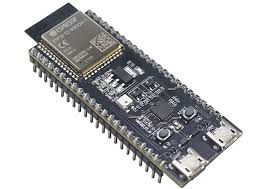
Short answer: Publish a small JSON health message from each device every 30 seconds, with a retained Last Will on a status topic. On a Raspberry Pi, add Pi-specific signals that generic agents miss: under-voltage and throttling from vcgencmd get_throttled, Wi-Fi RSSI, and a read-only root filesystem (a dying SD card). On an ESP32, publish free heap, minimum free heap, RSSI, uptime and the reset reason. ESP32s can’t run Linux tools, so at most sites a Raspberry Pi acts as the gateway. It runs Mosquitto locally and bridges the site’s telemetry to your central broker.
In this guide
- The health metrics that predict Raspberry Pi and ESP32 failures in the field
- Python collectors for Pi throttling, under-voltage, Wi-Fi signal and SD card health
- A hardened systemd service for the Pi agent
- A Raspberry Pi gateway with a Mosquitto bridge, and gateway-offline detection
- A complete ESP32 sketch: Last Will, boot reason and heap telemetry
- An alert table tuned for Pi and ESP32 hardware
Get the code: the Pi collectors (device/pi_metrics.py), the gateway bridge config and a simulated ESP32 are in the mqtt-iot-monitoring folder of ampaslabs/socketxp-blog-tutorials on GitHub. docker compose --profile gateway up -d runs the whole Pattern B setup on your laptop.
This guide is part of the MQTT IoT Monitoring series. It assumes the central Mosquitto, Telegraf, InfluxDB and Grafana stack from that guide is running.
Two Deployment Patterns
 Pattern A: Pi talks to the central broker directly
 ─────────────────────────────────────────────────
   Raspberry Pi ──MQTT──► Central Mosquitto ──► Telegraf ──► InfluxDB ──► Grafana

 Pattern B: Pi gateway per site, ESP32s behind it
 ─────────────────────────────────────────────────
   ESP32 ─┐
   ESP32 ─┼─MQTT─► Pi gateway (local Mosquitto) ══bridge══► Central Mosquitto ──► ...
   ESP32 ─┘        + its own health agent
                   + SocketXP agent (remote access, OTA updates)
Pattern A suits Pis with their own internet connection. Pattern B suits sites with many microcontrollers. Local devices keep working if the internet link drops, the site needs only one outbound connection, and the gateway gives you a Linux box on site that you can manage, update and reach remotely. The same layout is used in Remotely Access ESP32 Microcontroller over the Internet.
What to Monitor
| Signal | Raspberry Pi | ESP32 | What it predicts |
|---|---|---|---|
| CPU / memory / disk | ✅ psutil | Free heap only | Overload, memory leaks, full disk |
| Temperature | ✅ cpu_thermal | Rarely useful (internal sensor is inaccurate) | Thermal throttling, enclosure problems |
| Under-voltage | ✅ vcgencmd get_throttled | Shows up as brownout resets | Bad PSU or cable: the #1 cause of random Pi faults |
| Throttling | ✅ vcgencmd get_throttled | n/a | Slow app, missed deadlines |
| Read-only root FS | ✅ /proc/mounts | n/a | Failing SD card |
| Wi-Fi RSSI | ✅ /proc/net/wireless | ✅ WiFi.RSSI() | Dropouts, reconnect storms |
| Minimum free heap | n/a | ✅ ESP.getMinFreeHeap() | Memory leak, before it crashes |
| Reset reason | via uptime reset | ✅ esp_reset_reason() | Brownouts, watchdog timeouts, panics |
| Uptime | ✅ | ✅ millis() | Silent reboots |
| Firmware version | ✅ | ✅ | Which build is misbehaving |
Raspberry Pi: Pi-Specific Collectors
Add these functions to the Python agent from the main guide and merge their output into the telemetry payload.
import subprocess


def pi_throttled():
    """Decode `vcgencmd get_throttled` into flags (1 = set)."""
    try:
        out = subprocess.run(
            ["vcgencmd", "get_throttled"], capture_output=True, text=True, timeout=2
        ).stdout                                   # e.g. "throttled=0x50005"
        value = int(out.strip().split("=")[1], 16)
    except (OSError, IndexError, ValueError, subprocess.TimeoutExpired):
        return {}
    return {
        "undervolt_now":   int(bool(value & 0x1)),
        "throttled_now":   int(bool(value & 0x4)),
        "undervolt_boot":  int(bool(value & 0x10000)),   # occurred since boot
        "throttled_boot":  int(bool(value & 0x40000)),
    }


def wifi_rssi(iface="wlan0"):
    """Signal level in dBm, or None when not on Wi-Fi."""
    try:
        with open("/proc/net/wireless") as f:
            for line in f:
                if line.strip().startswith(iface + ":"):
                    return float(line.split()[3].rstrip("."))
    except OSError:
        pass
    return None


def root_readonly():
    """1 if / is mounted read-only (often a failing SD card)."""
    readonly = 0
    with open("/proc/mounts") as f:
        for line in f:
            _dev, mountpoint, _fstype, opts = line.split()[:4]
            if mountpoint == "/":
                readonly = int("ro" in opts.split(","))
    return readonly
Then, in the agent’s main loop:
payload.update(pi_throttled())
payload["root_ro"] = root_readonly()
rssi = wifi_rssi()
if rssi is not None:
    payload["rssi"] = rssi
payload["fw"] = os.getenv("FW_VERSION", "unknown")
How to read the throttled bits:
| Bit | Hex | Meaning |
|---|---|---|
| 0 | 0x1 | Under-voltage detected now |
| 1 | 0x2 | ARM frequency capped now |
| 2 | 0x4 | Currently throttled |
| 3 | 0x8 | Soft temperature limit active |
| 16 | 0x10000 | Under-voltage has occurred since boot |
| 17 | 0x20000 | Frequency capping has occurred |
| 18 | 0x40000 | Throttling has occurred |
| 19 | 0x80000 | Soft temperature limit has occurred |
throttled=0x50005 therefore means “under-voltage and throttled now, and both have happened since boot”. That’s a power supply problem, not a software one. The “since boot” bits matter because under-voltage often lasts only milliseconds, under a load spike, and would be missed by a 30-second sample of the “now” bits.
Run the Pi Agent as a systemd Service
Raspberry Pi OS (Bookworm and later) blocks pip install into the system Python, so use a virtual environment:
sudo useradd --system --no-create-home --groups video mqttagent
sudo mkdir -p /opt/mqtt-agent
sudo python3 -m venv /opt/mqtt-agent/venv
sudo /opt/mqtt-agent/venv/bin/pip install paho-mqtt psutil
sudo cp device_agent.py /opt/mqtt-agent/
The video group grants access to /dev/vcio, which vcgencmd needs. Without it, the throttled fields are silently missing.
Put the per-device settings in /etc/mqtt-agent.env, readable only by root (systemd reads it before dropping privileges):
MQTT_HOST=127.0.0.1
MQTT_PORT=1883
SITE=site1
DEVICE_ID=pi-gw-01
MQTT_PASSWORD=change-me
FW_VERSION=2026.11.1
sudo chmod 600 /etc/mqtt-agent.env
/etc/systemd/system/mqtt-agent.service
[Unit]
Description=MQTT device health agent
After=network-online.target
Wants=network-online.target

[Service]
User=mqttagent
Group=mqttagent
SupplementaryGroups=video
EnvironmentFile=/etc/mqtt-agent.env
ExecStart=/opt/mqtt-agent/venv/bin/python /opt/mqtt-agent/device_agent.py
Restart=always
RestartSec=5
NoNewPrivileges=true
ProtectSystem=strict
ProtectHome=true

[Install]
WantedBy=multi-user.target
sudo systemctl daemon-reload
sudo systemctl enable --now mqtt-agent
journalctl -u mqtt-agent -f
ProtectSystem=strict makes the filesystem read-only for the agent. That’s fine, because it only reads /proc and talks to the network.
The Raspberry Pi as a Site Gateway (Mosquitto Bridge)
In Pattern B, the Pi runs its own Mosquitto broker for the site’s ESP32s and forwards everything to the central broker over one bridge connection.
sudo apt install mosquitto mosquitto-clients
/etc/mosquitto/conf.d/gateway.conf
# Local listener for devices on the site network
listener 1883
allow_anonymous false
password_file /etc/mosquitto/passwd

# Bridge to the central monitoring broker
connection central
address mqtt.example.com:8883     # central broker, TLS
bridge_cafile /etc/mosquitto/certs/ca.crt
remote_clientid site1-gateway
remote_username site1-gateway
remote_password change-me-gateway
topic fleet/site1/# out 1
cleansession false

# Publish 1/0 on this topic when the bridge connects/disconnects.
# Mosquitto also registers "0" as the bridge's Last Will on the central broker.
notifications true
notification_topic fleet/site1/pi-gw-01/bridge
Create local credentials for each ESP32 and for the Pi’s own agent:
sudo mosquitto_passwd -c /etc/mosquitto/passwd pi-gw-01
sudo mosquitto_passwd /etc/mosquitto/passwd esp32-node-01
sudo systemctl restart mosquitto
On the central broker, let the gateway publish only its own site’s topics:
user site1-gateway
topic write fleet/site1/#
Things to know about bridges:
- Detecting gateway outages. When the whole site loses internet, the ESP32s stay connected to the local broker, so their Last Wills never fire. The central broker sees nothing from that site. The bridge notification topic covers this: it changes to
0on the central broker when the gateway drops off. Alert on it, and treat “bridge down” as “site unreachable”, not “40 devices offline”. - Buffering during outages. With
cleansession false, the local broker queues QoS 1 messages for the bridge (up tomax_queued_messages, 1,000 by default) and delivers them on reconnect. We tested this by stopping the central broker: QoS 1 messages arrived as soon as the bridge reconnected. QoS 0 telemetry published during the outage is dropped unless you setqueue_qos0_messages true. - Securing the bridge. The gateway dials out to the central broker over TLS on port 8883, so the site needs no inbound firewall rules. For per-gateway identity, add
bridge_certfileandbridge_keyfileso the bridge authenticates with a client certificate (mTLS). If your central broker isn’t reachable from the internet at all, the SocketXP agent already on the gateway can forward the bridge to it instead (see Remote Access MQTT Broker Behind NAT or Firewall).
ESP32: Health Telemetry Sketch
This Arduino-core sketch uses PubSubClient (no JSON library needed). It:
- Registers a retained
offlineLast Will - Publishes a boot event with the reset reason, once per boot
- Sends heap, minimum heap, RSSI, uptime and firmware version every 30 seconds
#include <WiFi.h>
#include <PubSubClient.h>
#include "esp_system.h"

#define FW_VERSION "1.0.3"

const char* WIFI_SSID = "site-wifi";
const char* WIFI_PASS = "change-me";
const char* MQTT_HOST = "192.168.1.10";      // the site gateway's Mosquitto
const char* MQTT_PASS = "change-me-esp32";
const char* SITE      = "site1";
const char* DEVICE_ID = "esp32-node-01";
const unsigned long INTERVAL_MS = 30000;

char topicStatus[64], topicTelemetry[64], topicEvent[64];
WiFiClient net;
PubSubClient mqtt(net);
unsigned long lastSend = 0;
bool bootReported = false;

const char* resetReason() {
  switch (esp_reset_reason()) {
    case ESP_RST_POWERON:   return "power_on";
    case ESP_RST_SW:        return "software";
    case ESP_RST_PANIC:     return "panic";
    case ESP_RST_INT_WDT:
    case ESP_RST_TASK_WDT:
    case ESP_RST_WDT:       return "watchdog";
    case ESP_RST_BROWNOUT:  return "brownout";
    case ESP_RST_DEEPSLEEP: return "deep_sleep";
    default:                return "other";
  }
}

void ensureWifi() {
  if (WiFi.status() == WL_CONNECTED) return;
  WiFi.begin(WIFI_SSID, WIFI_PASS);
  for (int i = 0; i < 40 && WiFi.status() != WL_CONNECTED; i++) delay(500);
}

bool ensureMqtt() {
  if (mqtt.connected()) return true;
  // connect(id, user, pass, willTopic, willQos, willRetain, willMessage)
  if (!mqtt.connect(DEVICE_ID, DEVICE_ID, MQTT_PASS, topicStatus, 1, true, "offline")) {
    return false;
  }
  mqtt.publish(topicStatus, "online", true);   // retained
  return true;
}

void setup() {
  snprintf(topicStatus, sizeof topicStatus, "fleet/%s/%s/status", SITE, DEVICE_ID);
  snprintf(topicTelemetry, sizeof topicTelemetry, "fleet/%s/%s/telemetry", SITE, DEVICE_ID);
  snprintf(topicEvent, sizeof topicEvent, "fleet/%s/%s/event", SITE, DEVICE_ID);

  WiFi.mode(WIFI_STA);
  mqtt.setServer(MQTT_HOST, 1883);
  mqtt.setKeepAlive(60);
  mqtt.setBufferSize(512);   // default 256 bytes is too small for most JSON payloads
}

void loop() {
  ensureWifi();
  if (!ensureMqtt()) {
    delay(5000);
    return;
  }
  mqtt.loop();

  if (!bootReported) {
    char boot[128];
    snprintf(boot, sizeof boot,
             "{\"event\":\"boot\",\"count\":1,\"reset_reason\":\"%s\",\"fw\":\"%s\"}",
             resetReason(), FW_VERSION);
    bootReported = mqtt.publish(topicEvent, boot);
  }

  if (millis() - lastSend >= INTERVAL_MS) {
    lastSend = millis();
    char payload[192];
    snprintf(payload, sizeof payload,
             "{\"heap\":%lu,\"heap_min\":%lu,\"rssi\":%d,\"uptime\":%lu,\"interval\":%lu,\"fw\":\"%s\"}",
             (unsigned long)ESP.getFreeHeap(), (unsigned long)ESP.getMinFreeHeap(),
             (int)WiFi.RSSI(), (unsigned long)(millis() / 1000),
             (unsigned long)(INTERVAL_MS / 1000), FW_VERSION);
    mqtt.publish(topicTelemetry, payload);
  }
}
Notes:
setBufferSize(512)matters. PubSubClient’s default 256-byte buffer silently drops larger messages, andpublish()returnsfalse.uptimeandintervallet the heartbeat watchdog in Detect Offline IoT Devices with MQTT Last Will and Heartbeats handle ESP32s and Pis on different schedules.- The reset reason is sent once per boot, not in every message. A reset counter in InfluxDB is more useful than repeating the same string every 30 seconds.
- The boot event can be lost on a cold start. PubSubClient only publishes at QoS 0. When a whole site powers up together, the ESP32 can send its boot event before the gateway’s bridge has connected, and the gateway drops QoS 0 messages for a disconnected bridge. We saw exactly this in testing. If boot events matter to you, use a client that supports QoS 1 publishes (ESP-IDF’s
esp-mqttor thearduino-mqttlibrary). The gateway then queues the event and delivers it when the bridge connects, which we also verified. Either way, the watchdog’s uptime check still catches the reboot. - For TLS or mTLS, replace
WiFiClientwithWiFiClientSecureand load the CA, certificate and key. See ESP32 mTLS Client Certificate Tutorial. On a local site network behind the gateway, plain MQTT plus passwords is a common trade-off, as long as the bridge to the central broker is encrypted.
Store boot events by adding one more input to Telegraf (and allowing fleet/+/+/event in its ACL):
[[inputs.mqtt_consumer]]
  servers = ["tcp://mosquitto:1883"]
  topics = ["fleet/+/+/event"]
  qos = 0
  client_id = "telegraf-events"
  username = "telegraf"
  password = "${MQTT_TELEGRAF_PASSWORD}"
  data_format = "json"
  tag_keys = ["event", "reset_reason", "fw"]

  [[inputs.mqtt_consumer.topic_parsing]]
    topic = "fleet/+/+/event"
    measurement = "_/_/_/measurement"
    tags = "_/site/device_id/_"
The text keys become tags, and the numeric count field gives each point a value. Chart sum(count) grouped by reset_reason to see brownouts and watchdog resets across the fleet.
Alerts Tuned for Pi and ESP32 Hardware
| Alert | Condition | Likely cause | First fix |
|---|---|---|---|
| Pi under-voltage | undervolt_boot = 1 | Weak PSU, long or thin USB cable | Official PSU, shorter cable |
| Pi throttling | throttled_now = 1 for 10 min | Heat, no heatsink or fan | Cooling, enclosure airflow |
| Pi SD card failing | root_ro = 1 | Worn or corrupt SD card | Replace the card; consider an SSD or read-only overlay FS |
| Pi disk full | disk > 90 % | Logs or containers growing | Log rotation, journalctl --vacuum-size |
| Weak Wi-Fi | rssi < −75 dBm for 15 min | Distance, interference, enclosure | Antenna, access point placement |
| ESP32 memory leak | heap_min falling day over day | Leak in firmware | Fix the leak; OTA update |
| ESP32 brownout | boot event reset_reason = brownout | Power dips under Wi-Fi TX load | Bigger capacitor, better regulator |
| ESP32 crash loop | ≥ 3 boot events in 1 hour | Panic or watchdog in firmware | Roll back firmware |
| Site gateway down | bridge topic = 0 for 5 min | Site internet or power outage | Contact site; check modem |
The heap_min trend is the most valuable ESP32 signal. Free heap jumps around with every Wi-Fi operation, but the low-water mark only ever goes down. If it keeps falling across days, the device will eventually crash, and you can see it coming a week ahead.
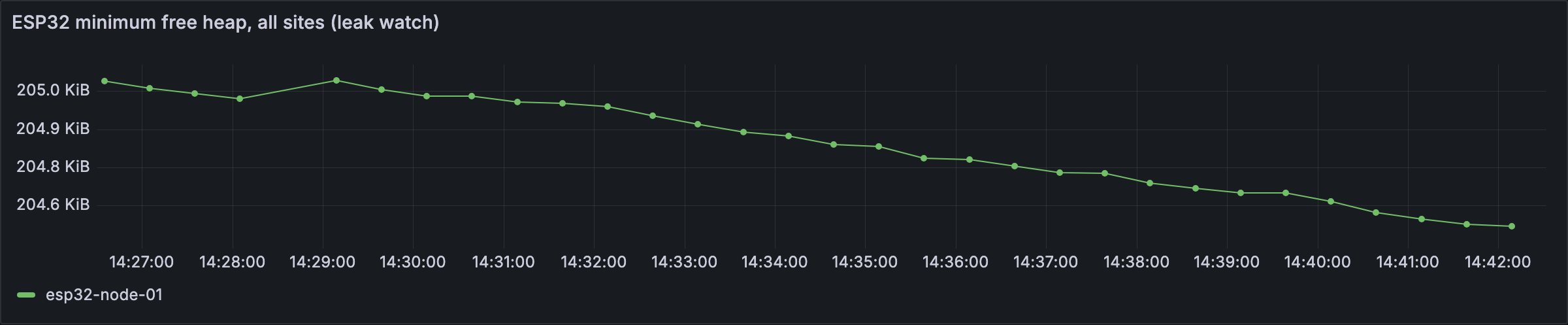
A falling minimum free heap on an ESP32 (simulated here). The trend is the warning sign; on a real device this slope plays out over days.
How SocketXP Complements Your Pi and ESP32 Monitoring
An alert table is only useful if you can act on what it tells you. MQTT tells you a Pi is under-volted or an ESP32 is leaking memory; SocketXP, an IoT device management and remote access platform, is how you fix it across the fleet:
- Raspberry Pi: SSH into the Pi remotely even behind NAT or CGNAT, to inspect
dmesgfor under-voltage events, runfsck, or rotate logs. Roll the updated agent or app out to every Pi with an OTA update: a pilot group first, then the fleet, with per-device status. - ESP32 behind a Pi gateway: SSH into the gateway, then reflash or OTA the ESP32 from there with
esptool.pyor the ESP32’s HTTP OTA. Details in Remotely Access ESP32 over the Internet. - Independent device alerts: the SocketXP agent on each Pi also sends its own online/offline, CPU, memory and log-pattern alerts by webhook. They still work when the MQTT pipeline itself is the thing that’s broken.
- Pi 5 and Jetson AIoT nodes: add
inference_msandmodel_versionto the payload, and push new models with OTA updates for AI/ML models.
For the full side-by-side comparison, see How SocketXP complements your MQTT monitoring setup.
Next Steps
- The central stack these devices report to: MQTT IoT Monitoring with Mosquitto
- Chart all of this: MQTT Grafana Dashboard with Mosquitto, Telegraf and InfluxDB
- Reliable offline alerts: Detect Offline IoT Devices with MQTT Last Will and Heartbeats
Frequently Asked Questions
How do I monitor a Raspberry Pi with MQTT?
Run a small Python agent with paho-mqtt and psutil on the Pi that publishes CPU, memory, disk, temperature and Pi-specific health (vcgencmd get_throttled flags, Wi-Fi RSSI, read-only filesystem) as JSON to a topic like fleet/site1/pi-01/telemetry every 30 seconds. Run it as a systemd service and collect the data with Telegraf, InfluxDB and Grafana.
How do I detect Raspberry Pi under-voltage remotely?
Run 'vcgencmd get_throttled'. Bit 0 (0x1) means under-voltage right now and bit 16 (0x10000) means under-voltage has occurred since boot. Publish both flags over MQTT and alert when either is set. The usual fix is a better power supply or a shorter, thicker USB cable.
What should I monitor on an ESP32?
Free heap and minimum free heap (to catch memory leaks), Wi-Fi RSSI, uptime (to spot reboots), the reset reason at boot (brownout, watchdog or panic) and the firmware version. Publish them as a small JSON message every 30 seconds with a retained Last Will on a status topic.
Why is my Raspberry Pi SD card going read-only?
When the SD card or its filesystem develops errors, Linux often remounts the root filesystem read-only to prevent further damage. Logs stop being written and apps fail in odd ways. Check /proc/mounts for an 'ro' flag on / and alert on it, then plan to replace the card.
Can an ESP32 run the SocketXP agent?
No. The ESP32 runs FreeRTOS, not Linux, so it can't run the SocketXP agent. The common pattern is a Linux gateway such as a Raspberry Pi on the same network: the ESP32 publishes MQTT to the gateway's Mosquitto, and the gateway runs SocketXP for remote access and OTA updates (including reflashing the ESP32 from the gateway) while Mosquitto bridges the telemetry to the central broker.
What is a Mosquitto bridge?
A Mosquitto bridge is a broker-to-broker connection. A local broker (for example on a site gateway) subscribes to or forwards selected topics to a remote broker. With 'topic fleet/site1/# out 1' every message from local devices under fleet/site1/ is forwarded to the central broker over one connection.