
You have built an AI inference server—a FastAPI or Flask application that loads a trained model and serves predictions via a REST API. It runs perfectly on localhost:8000 on your development machine or GPU server.
Now you need to:
- Let a front-end application call the API from a different machine.
- Share the endpoint with a client for a demo.
- Integrate it with a mobile app or web service.
- Test the API from a different network.
The problem: localhost:8000 is only accessible on the machine where the server runs. Anyone outside—on a different network, a different machine, or the internet—cannot reach it.
This guide shows how to use SocketXP Remote Access Solution to create a permanent public HTTPS URL for any local inference server with a single command.
Common AI Inference Servers SocketXP Can Expose
| Framework | Language | Default Port | Use Case |
|---|---|---|---|
| FastAPI + uvicorn | Python | 8000 | High-performance REST inference API |
| Flask | Python | 5000 | ML model prediction endpoint |
| Gradio | Python | 7860 | Interactive model demo |
| Streamlit | Python | 8501 | Data science web app |
| TorchServe | Python/Java | 8080 | PyTorch model serving |
| BentoML | Python | 3000 | Model serving framework |
| Triton Inference Server (HTTP) | C++ | 8000 | NVIDIA multi-model serving |
| llama.cpp server | C++ | 8080 | LLM inference |
| Ollama | Go | 11434 | Local LLM management |
All follow the same pattern: socketxp connect http://localhost:<port>.
How It Works
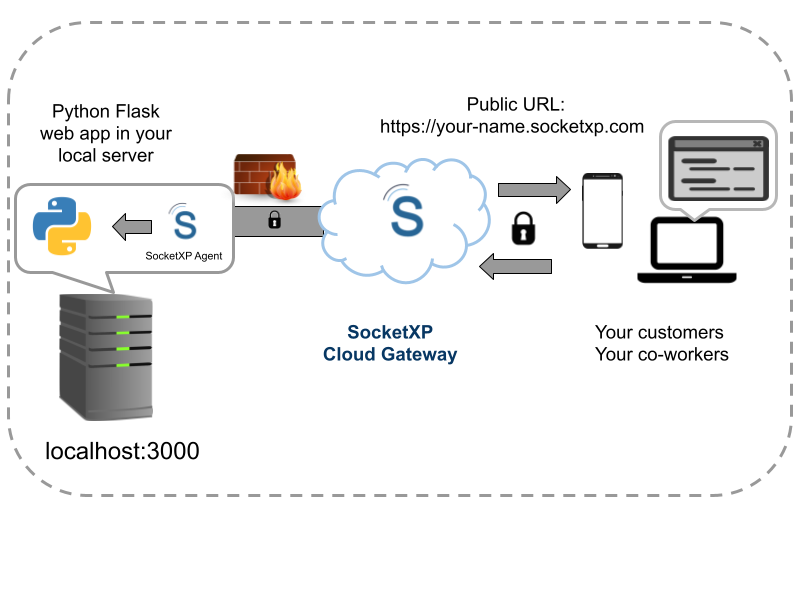
SocketXP installs a lightweight agent on your server. The agent creates an outbound SSL/TLS tunnel to the SocketXP Cloud Gateway. SocketXP assigns a permanent public HTTPS URL. Any client that sends an HTTP request to that URL receives the response from your local inference server—securely and without any router configuration.
Step-by-Step: Expose Your FastAPI Inference Server
Step 1: Build and Start Your Inference Server
Here is a minimal FastAPI inference server example:
# main.py
from fastapi import FastAPI
from pydantic import BaseModel
import numpy as np

app = FastAPI()

class InferenceRequest(BaseModel):
    inputs: list[float]

@app.get("/")
def root():
    return {"status": "inference server running"}

@app.post("/predict")
def predict(request: InferenceRequest):
    # Replace with your actual model inference logic
    inputs = np.array(request.inputs)
    result = float(inputs.sum())  # placeholder
    return {"prediction": result}
Start the server:
$ uvicorn main:app --host 127.0.0.1 --port 8000
INFO:     Uvicorn running on http://127.0.0.1:8000
INFO:     Application startup complete.
Verify locally:
$ curl http://localhost:8000/
{"status":"inference server running"}
Step 2: Install the SocketXP Agent
Download and install the SocketXP agent on the machine running your inference server.
Step 3: Authenticate the Agent
Sign up at the SocketXP Web Portal and copy your authentication token.
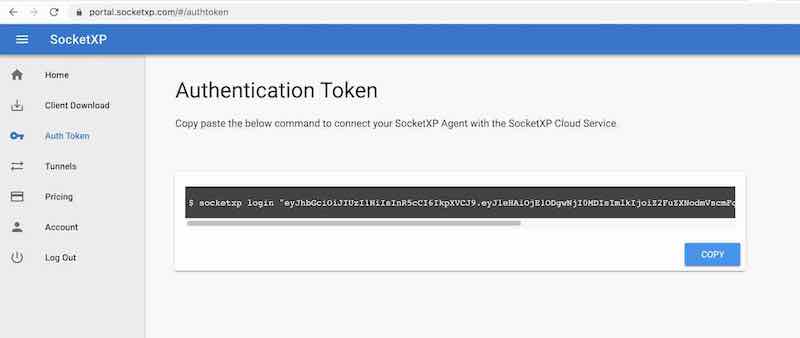
$ socketxp login "eyJhbGciOiJIUzI1NiIsInR5cCI6IkpXVCJ9..."
Step 4: Create the Public HTTPS Tunnel
$ socketxp connect http://localhost:8000

Public URL -> https://your-user-id-abc123.socketxp.com
Your inference server is now accessible at https://your-user-id-abc123.socketxp.com from anywhere on the internet.
Step 5: Call Your API Remotely
$ curl -X POST https://your-user-id-abc123.socketxp.com/predict \
  -H "Content-Type: application/json" \
  -d '{"inputs": [1.0, 2.0, 3.0]}'

{"prediction": 6.0}
Or from a Python client:
import requests

BASE_URL = "https://your-user-id-abc123.socketxp.com"

response = requests.post(
    f"{BASE_URL}/predict",
    json={"inputs": [1.0, 2.0, 3.0]}
)
print(response.json())
Example: Flask Inference Server
If you prefer Flask:
# app.py
from flask import Flask, request, jsonify
import json

app = Flask(__name__)

@app.route('/predict', methods=['POST'])
def predict():
    data = request.get_json()
    # Replace with your model inference logic
    result = sum(data.get('inputs', []))
    return jsonify({'prediction': result})

if __name__ == '__main__':
    app.run(host='127.0.0.1', port=5000)
$ python app.py
$ socketxp connect http://localhost:5000
Public URL -> https://your-user-id-abc123.socketxp.com
Example: Expose TorchServe’s Inference API
If you are using TorchServe to serve a PyTorch model:
# Start TorchServe (inference API on port 8080, management on 8081)
$ torchserve --start --model-store model_store --models mymodel.mar

# Expose the inference API
$ socketxp connect http://localhost:8080
Public URL -> https://your-user-id-abc123.socketxp.com
Remote clients can now call https://your-user-id-abc123.socketxp.com/predictions/mymodel from anywhere.
FastAPI Interactive Docs (/docs) Remotely
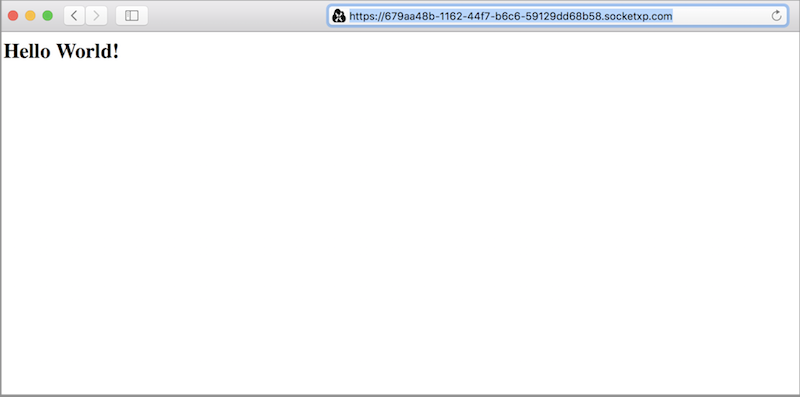
FastAPI automatically generates interactive API documentation (Swagger UI) at /docs. Once your tunnel is live, you can open https://your-user-id-abc123.socketxp.com/docs in any browser to test your inference endpoints interactively—useful for sharing with clients or team members for API review.
Adding Authentication to Your Inference API
The SocketXP public URL is accessible to anyone who knows it. If your inference API is not meant to be public, add API key authentication in FastAPI:
from fastapi import FastAPI, HTTPException, Header

API_KEY = "your-secret-api-key"

app = FastAPI()

@app.post("/predict")
def predict(x_api_key: str = Header(None)):
    if x_api_key != API_KEY:
        raise HTTPException(status_code=401, detail="Invalid API key")
    # ... inference logic
    return {"prediction": 42}
Clients must include the X-API-Key header in every request. SocketXP’s SSL/TLS encryption ensures the key is protected in transit.
Keeping the Tunnel Alive Permanently
To run the tunnel as a background service that persists across reboots, configure the SocketXP agent as a systemd service. See the SocketXP Getting Started guide for configuration steps.
Running Inference on Edge Devices
The same approach works for AI inference servers running on edge devices—NVIDIA Jetson Orin, Raspberry Pi with Hailo AI HAT, or any embedded Linux machine. Install the SocketXP agent on the edge device, start your inference server, and run socketxp connect http://localhost:<port> to get a public URL for the edge inference endpoint.
This enables a pattern where your inference runs entirely at the edge (low latency, no cloud cost, data stays local) but the API endpoint is accessible from anywhere via the SocketXP tunnel.
Why SocketXP vs ngrok for AI Inference APIs?
ngrok is a popular tool for similar use cases, but it has key limitations:
- Free tier URLs change every session: Your client application’s hardcoded endpoint breaks whenever ngrok restarts.
- No persistent tunnel without a paid plan: Free ngrok tunnels time out after a few hours.
- ngrok’s free tier is rate-limited: Not suitable for production inference traffic.
SocketXP provides a permanent URL that does not change, persistent tunnels, and is designed for long-running services—making it more suitable for production AI inference endpoints or long-running demos.
Conclusion
Exposing a local FastAPI, Flask, TorchServe, or any Python-based AI inference server to the internet takes one command with SocketXP: socketxp connect http://localhost:<port>. The permanent public HTTPS URL lets any client call your inference API from anywhere—no cloud deployment, no port forwarding, no public IP.
Your model stays on your own hardware, your data stays on your own machine, and you maintain complete control. SocketXP handles the secure connectivity.
For more on SocketXP’s tunneling and remote access capabilities, visit the SocketXP IoT Remote Access page or explore related guides:
- Remote Access Jupyter Notebook from Anywhere
- Remote Access Ollama from Anywhere
- Remote Access TensorBoard, Gradio, and MLflow
Frequently Asked Questions
Can I expose a locally running FastAPI inference server to the internet without a public IP?
Yes. SocketXP installs a lightweight agent on the machine running FastAPI. The agent creates an outbound SSL/TLS tunnel to the SocketXP Cloud Gateway, which assigns a permanent public HTTPS URL. Send API requests to that URL from anywhere—they are forwarded securely to your local FastAPI server.
Does the SocketXP public URL support HTTPS and SSL for API clients?
Yes. SocketXP's public URL is always HTTPS (TLS encrypted). API clients connect over HTTPS to the SocketXP Cloud Gateway, which forwards the request through the encrypted tunnel to your local server. Your inference server can listen on plain HTTP localhost—SocketXP handles the TLS termination at the cloud gateway.
Can I use the SocketXP public URL as an API endpoint in my mobile or web application?
Yes. The permanent public HTTPS URL can be used as a base URL in any client application—mobile apps, web frontends, Postman collections, or automated scripts. It behaves like any standard HTTPS API endpoint.
How is this different from deploying to AWS Lambda or a cloud VM?
With SocketXP you run the inference server on your own hardware—a powerful local GPU machine, a home lab server, or an edge device—and expose it via a secure tunnel. You avoid cloud compute costs, your model weights stay on your own machine, and you maintain full control. There is no cloud deployment, no container registry, and no cloud provider dependency.
Can I share the URL with clients or external users to call my API?
Yes. You can share the SocketXP public URL with external users or clients. They call the API at the URL—requests are forwarded to your local server. For APIs that should not be publicly accessible, implement authentication in your FastAPI/Flask app (API keys, OAuth2, JWT) before sharing the URL.
Can I run multiple AI inference servers and expose each with a different URL?
Yes. Run multiple servers on different ports (e.g., 8000, 8001, 8002) and create a separate SocketXP tunnel for each: 'socketxp connect http://localhost:8000', 'socketxp connect http://localhost:8001'. Each gets its own permanent public URL.
How does SocketXP compare to ngrok for exposing a local FastAPI inference server?
ngrok's free tier generates a new random URL every time the tunnel restarts, which means any client application or API integration that uses the URL breaks after a restart. SocketXP provides a permanent URL that does not change, making it more suitable for inference APIs that are called by applications with hardcoded or configured endpoints.
Can I use SocketXP to receive webhook callbacks on a locally running FastAPI server?
Yes. This is one of the most practical uses of SocketXP for AI development. If you are integrating with external services that send webhooks (Stripe, GitHub, Hugging Face Inference API callbacks, etc.), expose your local FastAPI endpoint with 'socketxp connect http://localhost:8000' and give the SocketXP public URL as the webhook destination. You can test webhook flows locally without deploying.
Can I expose a FastAPI inference server running on a Jetson Orin or Raspberry Pi?
Yes. The SocketXP agent runs on any Linux device including NVIDIA Jetson Orin, Jetson Nano, and Raspberry Pi. Install the agent on the edge device, start your FastAPI server on localhost, and run 'socketxp connect http://localhost:8000'. You get a public URL for your edge inference API—clients can call it from anywhere while inference runs entirely on the edge device.
How do I use Postman or API testing tools with a locally running FastAPI server?
Create a SocketXP tunnel for your local FastAPI server and use the public URL as the base URL in Postman, Insomnia, or any API testing tool. This lets you test your inference API from any machine—or share the Postman collection with teammates so they can run the same tests against your local server remotely.
Can I deploy an AI model as a FastAPI app on a server without a public IP and expose it with SocketXP?
Yes. This is the core use case. Deploy your model-serving FastAPI app on any Linux server (home lab, private cloud VM, on-premises server, or edge device), run the SocketXP agent alongside it, create the tunnel, and your inference API is accessible over HTTPS from anywhere. No public IP, no cloud deployment, no Kubernetes cluster required.