
The world of IoT is exploding, with devices from smart home sensors to industrial robots needing to be connected, managed, and monitored remotely. For years, the go-to solution for secure remote access has been the trusty VPN. But for modern IoT deployments, the traditional VPN is starting to show its age.
This article assumes you’ve already ruled out port forwarding and a VPN and want to understand the architecture that replaces them — Zero-Trust secure tunneling — plus a full hands-on walkthrough. If you’re still weighing port forwarding, VPN, and a tunnel against each other, see the head-to-head comparison first.
Why Your Old VPN is a Headache for IoT Remote Access
Think about the last time you set up a VPN: complex firewall rules, static IPs or DDNS, and per-device client configuration that doesn’t scale past a handful of devices.
Beyond the hassle, VPNs present a serious security issue: the “all or nothing” model. A VPN client, once connected, often gets broad access to the entire network behind the firewall. This creates a larger attack surface, making your entire network vulnerable if even one device is compromised — a real risk when every device is a potential entry point.
For the full breakdown of port forwarding vs. VPN vs. tunnel-based access — setup complexity, CGNAT compatibility, attack surface — see the comparison guide. Here, we focus on why the tunnel-based Zero-Trust model specifically solves the VPN scaling and exposure problem.
Secure Tunneling: The Modern Solution for Remote IoT Management
Enter secure tunneling, a modern, lightweight, and far more secure alternative. Think of a secure tunnel as a private, encrypted "digital pipe" connecting a single device to a cloud service.
How It Works:
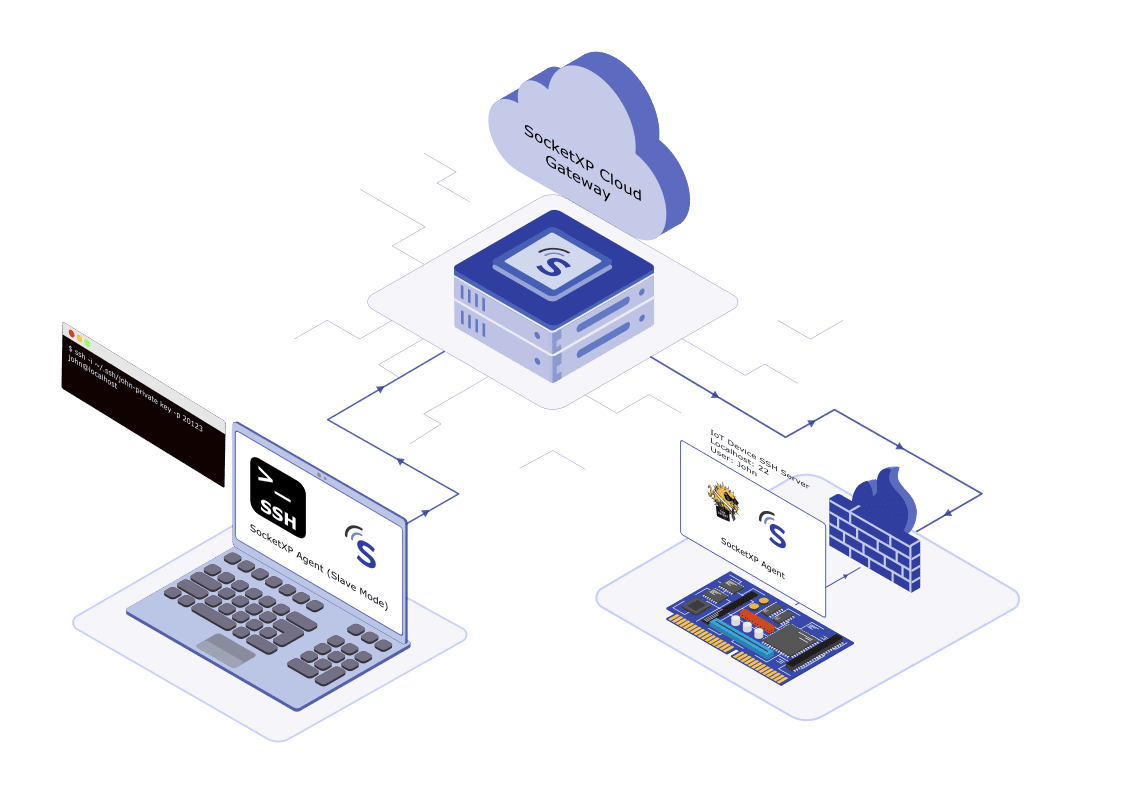
A lightweight agent on your IoT device initiates an outbound connection to a secure cloud service like SocketXP.
This connection establishes an encrypted, persistent SSL/TLS tunnel to the SocketXP cloud gateway.
When you want to access the device remotely, you connect to the cloud gateway, which routes your request securely and directly through the tunnel to your device.
This approach flips the traditional model on its head. Instead of opening a permanent inbound door (like a port-forwarding or VPN), the device creates a secure, outbound connection. This means you don’t need to change firewall settings, and your network remains completely invisible and protected from the outside world.
Ready to Ditch the VPN for IoT Remote Access?
Get secure, Zero-Trust access to your devices with no VPN and no port forwarding. Try free for 30 days.
Beyond the Firewall: Embracing a Zero-Trust Model for Your Devices
Secure tunneling is the perfect technology to implement a Zero-Trust security model. The core principle of Zero-Trust is “never trust, always verify.” Instead of assuming a user or device is safe once it’s on the network, it assumes every request could be a threat.
SocketXP’s secure tunneling is built on this principle. The tunnel grants access to only the specific service (port) in a specific device you need to manage, and only for the duration of the session. This is implemented through a timebound access token and RBAC rules. There is no broad network access, eliminating the risk of a compromised device being used to traverse your private network.
This powerful approach means you no longer have to worry about the hassle of port-forwarding or IP whitelisting. The SocketXP agent handles the NAT traversal and firewall bypass automatically, making secure connectivity as simple as a single command.
Use Cases and Real-World Benefits
The benefits of secure tunneling extend across a wide range of industries:
Industrial IoT (IIoT): Remotely access and troubleshoot PLCs, sensors, and HMIs without ever setting foot on-site.
Smart Kiosks & Vending Machines: Easily push software updates and monitor the health of remote retail devices.
Telehealth: Ensure a secure, compliant, and real-time data flow from remote medical devices.
Remote Servers and Labs: Get secure shell (SSH) access to your edge devices without a VPN.
Getting Started with SocketXP: A Step-by-Step Guide
Ready to ditch the VPN? Getting started with SocketXP is incredibly simple.
- Create Your Account: Sign up for a free account on the SocketXP website.
- Install the Agent: Download and install the lightweight SocketXP agent on your IoT device.
- Create the Tunnel: From your terminal, run a simple command to start a tunnel for your device.
- Access the Device: From the SocketXP cloud web portal, view, manage and access all your devices remotely.
What is SocketXP
SocketXP is a cloud based IoT remote access and device management solution that provides secure access to remotely located IoT devices such as a Raspberry Pi, Arduino, Nvidia Jetson, or any embedded Linux devices behind NAT router or firewall over the internet using secure reverse proxy SSL/TLS tunnels.
SocketXP IoT Remote Access Solution does not require any changes to your gateway NAT router configuration. No port forwarding setup or firewall pinholing is required, when you use SocketXP.
SocketXP creates a secure SSL/TLS encrypted tunnel through your firewall and NAT router over the internet for remote SSH access — using the same SSL/TLS encryption technology a VPN relies on, but scoped to a single service rather than the whole network.
SocketXP uses two-factor authentication to authenticate users before they can SSH into any remote device.
How SocketXP IoT Remote Access solution works
Here’s an example for creating a secure tunnel to your Raspberry Pi for SSH access:
Follow the below steps to setup SocketXP IoT agent and remote SSH into your IoT using SocketXP IoT Remote Access solution.
Step 1: Download and Install
Download and install the SocketXP IoT agent on your IoT device from here.
Step 2: Get your Authentication Token
Sign up at SocketXP Web Portal and get your authentication token.
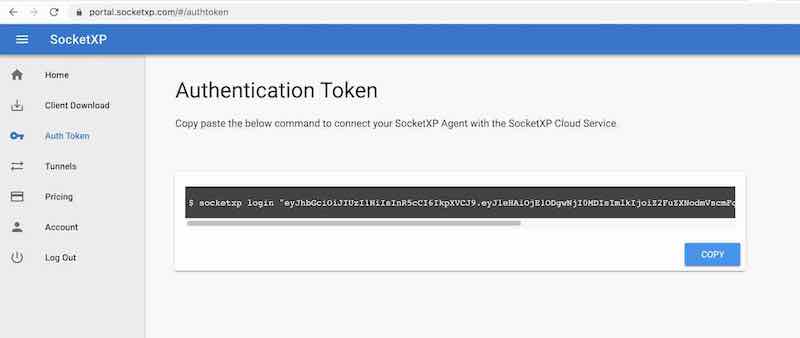
Use the following command to login to the SocketXP IoT Cloud Gateway using the auth token.
$ socketxp login [your-auth-token-goes-here]
Step 3: Create SocketXP SSL Tunnel Endpoint for Remote SSH
Use the following command to create a secure and private SSL tunnel endpoint at the SocketXP IoT Cloud Gateway.
 $ socketxp connect tcp://localhost:22

Connected to SocketXP Cloud Gateway.
Access the TCP service securely using the SocketXP agent in IoT Slave Mode.
Note:
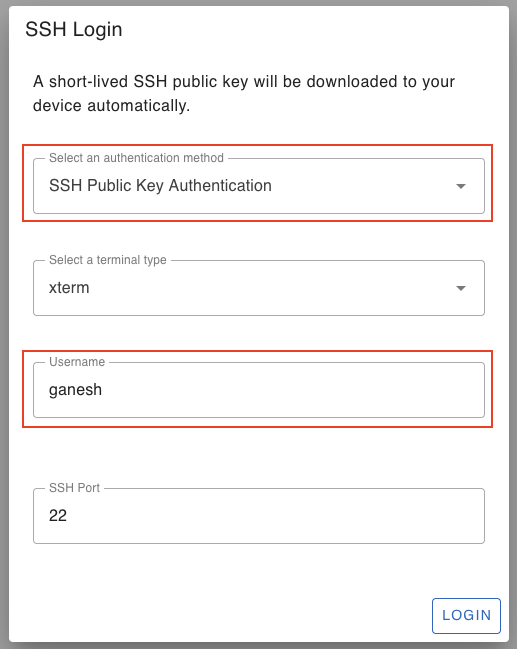
From the SocketXP web portal’s “Devices” page, click the “terminal” icon to SSH into your remote device.
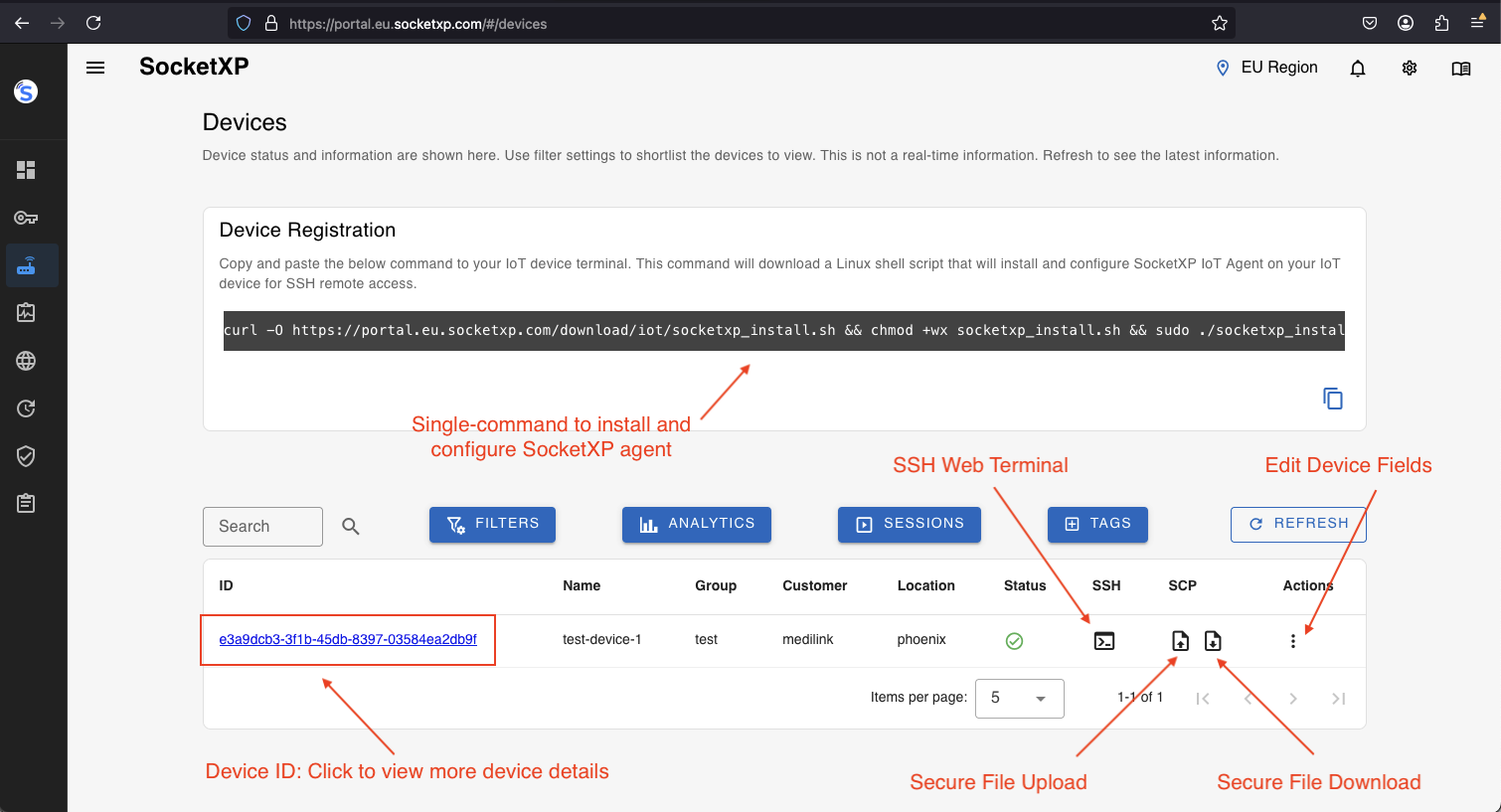
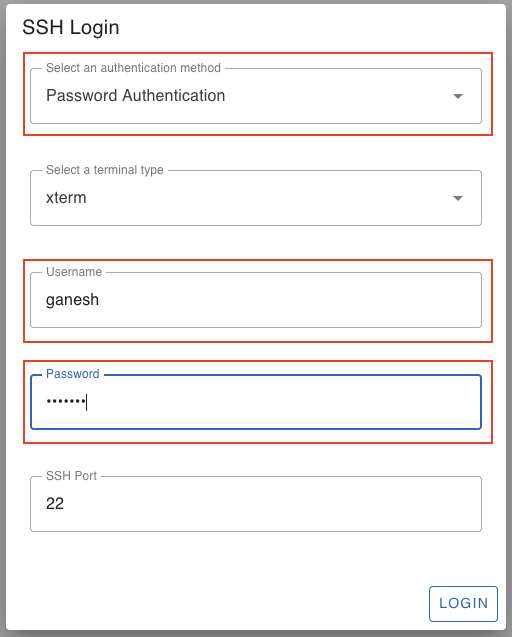
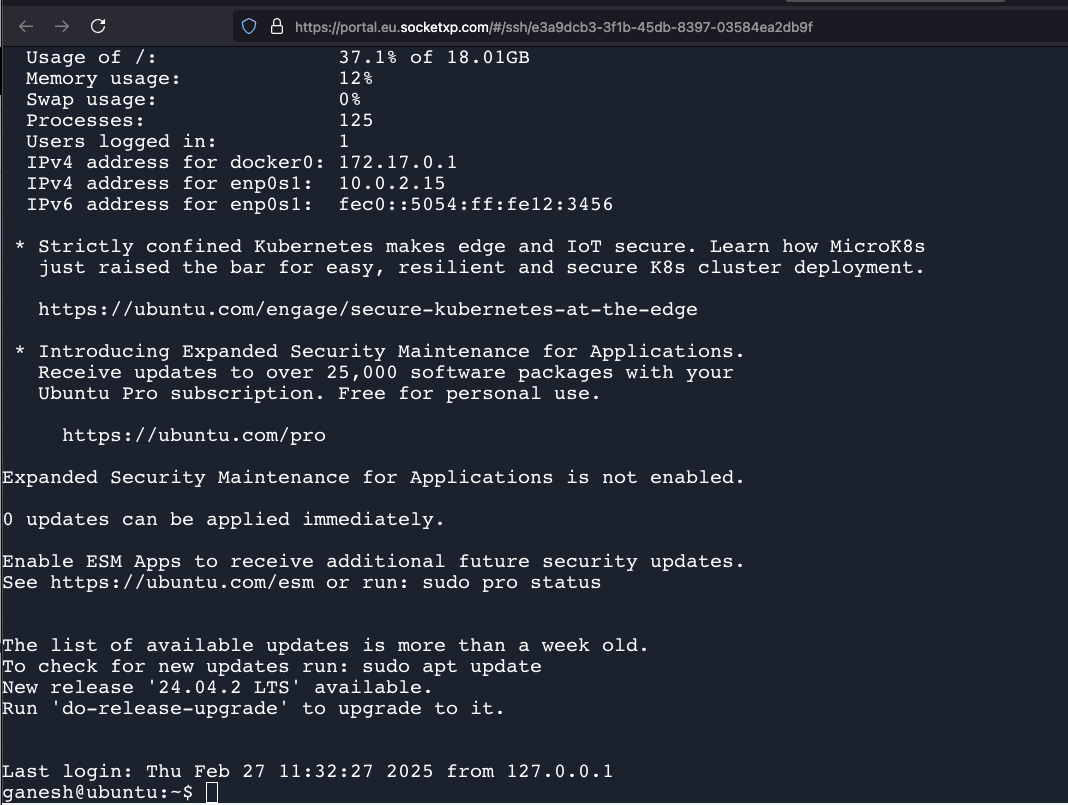
You have the option of using SSH password based authentication or SSH public private key based authentication to login to your remote devices. SocketXP will automatically create and download a public key to your remote device. It does key management behind the scenes automatically.
Remote Access VNC, RDP, Web APP
You have just learnt how to remotely access your IoT device via SSH using SocketXP. Next, you can learn how to remotely access your IoT desktop via VNC, RDP. Also, learn how to remotely access your IoT Web App using a crypto-random public web URL provided by SocketXP.
- Remote access the GUI desktop of an IoT using VNC without port forwarding and VPNs
- Remote access the GUI desktop of an IoT using RDP without port forwarding and VPNs
- Remote access the web application in an IoT without port forwarding and VPNs
- Execute remote commands on IoT without port forwarding and VPNs
Conclusion: Secure Your IoT Future Today
The days of complicated, insecure, and unscalable remote access for IoT are over. Secure tunneling solutions like SocketXP offer a powerful, simple, and secure alternative to traditional VPNs. By embracing this new approach, you can accelerate your IoT deployments, reduce your attack surface, and ensure your remote device management is both efficient and safe.
SocketXP is more than just an IoT remote access solution. It is primarily an IoT Device Management Platform, that can perform remote device monitoring, remote asset tracking, device management, and remote software OTA update.
Are you ready to stop fighting with firewalls? Try SocketXP today and experience a truly post-VP/N world.
Frequently Asked Questions
Why not just use a VPN for IoT remote access?
A VPN's 'all or nothing' access model grants a connected client broad access to the entire network behind the firewall, which widens the attack surface if any one device is compromised. It also requires static IPs or DDNS, per-device client configuration, and doesn't scale cleanly to fleets of hundreds or thousands of devices. SocketXP's secure tunnel is scoped to a single service on a single device per session, with no broad network access granted.
What does Zero-Trust mean in the context of SocketXP's tunneling model?
Zero-Trust means no user or device is trusted by default, even after connecting. SocketXP enforces this with timebound access tokens and RBAC rules: a session grants access to only the specific port on the specific device being managed, only for the duration of that session — not standing access to the broader network.
Does SocketXP eliminate the need for port forwarding?
Yes. The SocketXP agent initiates an outbound connection from the device, so there is never an inbound port to forward or a firewall rule to configure — it works the same way whether the device is behind a home router, an office firewall, or CGNAT.
How does SocketXP compare to ngrok or TeamViewer for IoT?
Ngrok is a general-purpose, session-based tunneling tool not built for fleet-scale IoT management — tunnels are typically ephemeral and lack device grouping or OTA capabilities. TeamViewer is built for ad-hoc GUI remote control, not headless Linux device management. SocketXP is purpose-built for IoT: persistent per-device tunnels, SSH/VNC/RDP/HTTPS access, device grouping, and fleet-wide OTA updates in one platform.
I'm still deciding between port forwarding, a VPN, or a tunnel — where do I start?
Start with SocketXP's head-to-head comparison of port forwarding, VPN, and its outbound tunnel architecture, which covers setup complexity, CGNAT compatibility, and attack surface for each option. This article assumes you've already decided to move off VPN and covers the Zero-Trust tunnel architecture and hands-on setup in depth.