
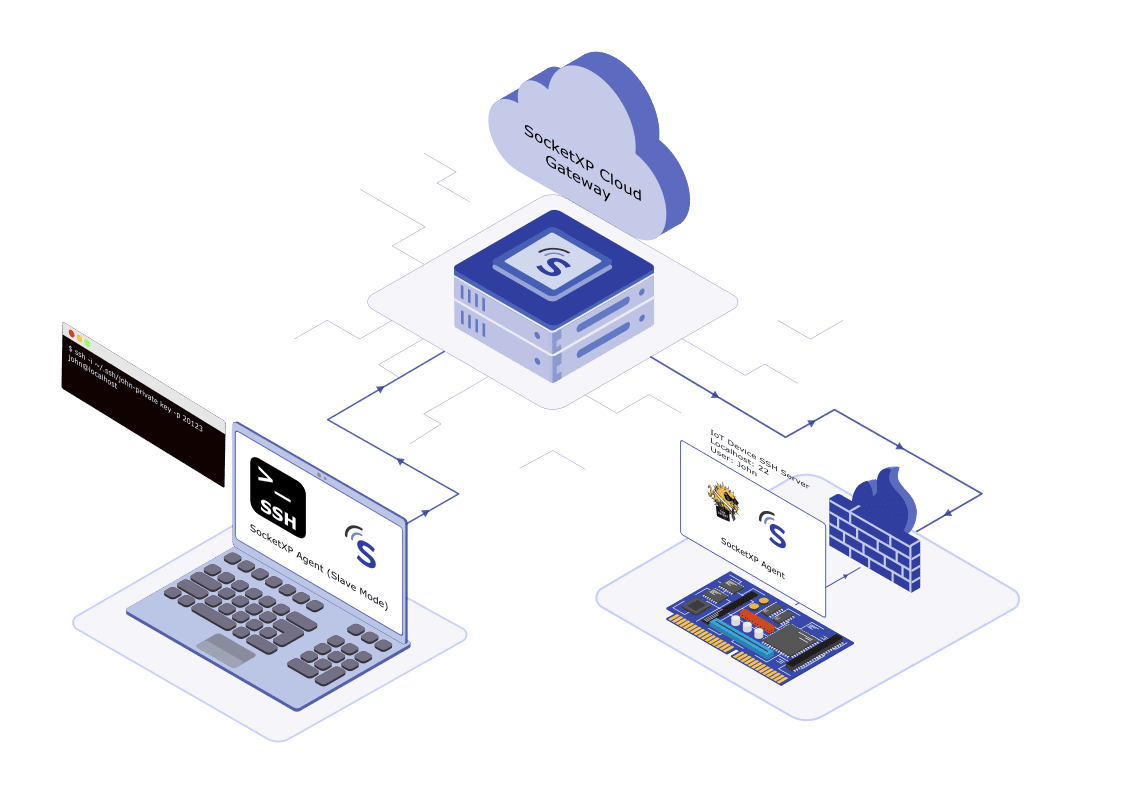
When an IoT device sits behind a NAT router or firewall, there are really only three ways to reach it from outside: forward a port, setup a VPN connection, or use an outbound reverse tunnel.
Most guides present port forwarding and VPNs as if they were the only two options.
They’re not the best two — here’s a direct comparison of all three, including where SocketXP’s tunnel architecture actually differs from a VPN.
Option 1: Port Forwarding
Port forwarding configures your router to send incoming traffic on a specific public port straight to a specific device’s IP and port on your private network.
The risks:
- Exposes the device’s SSH (or VNC/RDP) port directly to internet scanners and brute-force bots — these ports are actively probed within minutes of being opened
- Requires a static public IP, or a DDNS service to track a changing one
- Fails completely behind CGNAT — if your ISP doesn’t give your router a real public IP, there is nothing to forward to
- Has to be configured per device, per router — unmanageable across customer sites you don’t control
It works for a single device on a network you administer and don’t mind exposing. It falls apart at any scale, and it’s outright impossible behind CGNAT, which is increasingly the default on cellular and many residential ISP connections.
Tired of Port Forwarding and VPN Headaches?
Reach any device with a secure tunnel. No open ports, no VPN. Try free for 30 days.
Option 2: VPN
A VPN creates an encrypted network-layer tunnel so a remote machine appears to be on the local network. This avoids exposing the device’s SSH port directly — but it doesn’t eliminate the underlying problem, it moves it.
Why it’s not actually a fix for IoT:
- The VPN server itself still needs to be reachable from outside — which usually means the exact port forwarding problem above, just applied to one machine instead of many
- Every operator who needs access must install and configure VPN client software
- NAT traversal for the VPN’s own connection can still fail behind symmetric or carrier-grade NAT
- Each device typically needs its own client configuration and credential; there’s no native device grouping, fleet dashboard, or centralized access control
- Puts the remote device on the same network segment as everything else on the VPN, widening the attack surface beyond just the service you actually need to reach
A VPN is a reasonable choice for connecting a team’s laptops to office infrastructure. It’s a poor fit for reaching one SSH port on a device deployed at a customer site you don’t administer.
Option 3: SocketXP’s Outbound Reverse Proxy Tunnel
SocketXP’s agent runs on the device and initiates an outbound SSL/TLS connection to the SocketXP Cloud Gateway, the same directional principle that lets tools like Cloudflare Tunnel, Tailscale, and even consumer remote-desktop tools like TeamViewer or AnyDesk work behind CGNAT, applied here specifically to IoT fleet access with device grouping, mTLS certs, and RBAC that those consumer tools don’t provide.
Because the device starts the connection, there’s nothing for the router or firewall to block, and nothing for a scanner to find:
- No inbound port, ever — not on the device, not on a VPN server
- No client software required for browser-based SSH, VNC, or RDP access
- Works identically behind CGNAT, symmetric NAT, and corporate firewalls
- Scoped access — only the specific service you tunnel is reachable, not the whole device’s network segment
- mTLS device certificates plus short-lived, auto-generated SSH keys per session — no static credentials accumulating on the device
RDP and VNC Behind a Firewall — What This Looks Like in Practice
rdp-and-vnc-behind-a-firewall
The same outbound-tunnel principle applies whether you’re reaching a terminal (SSH), a Windows desktop (RDP), or a graphical Linux desktop (VNC) — the protocol running behind the firewall doesn’t change, only what’s forwarded through the tunnel does.
Example: exposing SSH on a Linux device behind a firewall
Install the SocketXP agent on the Linux device (or the network segment’s gateway machine). Run
Run socketxp connect
tcp://localhost:22 --tcp
to tunnel the local SSH port outbound.Connect using the generated URL as the host, or point your SSH client at the tunnel endpoint, no inbound rule on the router, no static IP, no VPN client.
Example: VNC to a Raspberry Pi or industrial PC behind CGNAT Same flow, tunneling port 5900 instead of 3389. Because the connection is outbound-initiated, this works identically whether the device sits behind a home router, a corporate firewall, or carrier-grade NAT on a cellular gateway — the three environments where port forwarding fails outright.
This means you never need to log into the router to expose RDP/VNC, which is otherwise the most common way these ports end up scanned and brute-forced within minutes of being opened.
Beyond SSH: Site-to-Site, API Gateways, Webhooks, and Kubernetes Ingress
beyond-ssh
The “expose localhost” use case is the starting point, but the same outbound-tunnel model extends to the other places teams traditionally reach for a VPN:
Site-to-site: Instead of a full network-layer VPN linking two sites, SocketXP tunnels expose only the specific services each side needs — reducing the shared attack surface to named ports, not whole subnets.
API gateways: A device or edge cluster can expose its API endpoint outbound through a tunnel, letting your cloud API gateway route to it without the device ever needing an inbound listener.
Webhooks: Because the tunnel URL is stable and authenticated, third-party services can deliver webhooks to a device or edge service behind NAT — something impossible with a raw VPN client that isn’t itself reachable inbound.
Kubernetes ingress: For edge K8s clusters (e.g., k3s on-site), the same agent pattern can tunnel a cluster’s ingress controller outbound, avoiding a LoadBalancer or NodePort that needs a public IP.
This is the same directional principle as the original SSH/RDP/VNC use case — outbound-only, scoped per service — just applied to different protocols and workloads.
At fleet scale, this also answers the two questions that come up once you’re past a handful of devices: each device gets its own unique, authenticated URL your cloud services can call on demand, and your backend can reach SSH on thousands of devices across different customer firewalls without ever asking a customer to open a port — because every one of those devices already holds an outbound connection to the gateway.
Head-to-Head Comparison
| Feature | Port Forwarding | VPN | SocketXP (Secure Tunnel) |
|---|---|---|---|
| Inbound port required | Yes, on the device | Yes, on the VPN server | No |
| Works behind CGNAT | No | Often unreliable | Yes |
| Client software required | No | Yes, on every operator machine | No (browser-based access) |
| Exposes device directly to internet | Yes | No, but exposes VPN server | No |
| Access scope | Whole port, unauthenticated until app-layer login | Whole network segment | Only the tunneled service |
| Supports RDP / VNC / kiosk HTTPS access | Yes, but each needs its own forwarded port | Yes, once connected to the VPN | Yes, one tunnel command per service, no extra ports |
| Per-device setup effort | Router config per device | VPN client config per device | Single login command per device |
| Fleet device grouping | Not built in | Not built in | Built in |
| Fits site-to-site / API gateway / webhook delivery | Requires manual per-service exposure | Requires full VPN mesh or gateway | Native — each service gets its own scoped tunnel |
| Maintenance burden | Router config drifts, breaks on ISP changes | VPN server patching, cert rotation | Managed SaaS, or self-hosted licensed option |
Setting It Up
The full setup is one login command and a config file — see the complete walkthrough for getting past NAT and firewalls for every step. The short version:
sudo socketxp loginsudo socketxp service install --config /etc/socketxp/config.json sudo systemctl enable socketxp sudo systemctl start socketxp
No router login, no VPN server to provision, no client install for browser-based access. The device appears in the SocketXP portal as soon as the agent connects.
If you’ve settled on a tunnel-based approach and want the underlying Zero-Trust architecture — timebound access tokens, RBAC, and a full walkthrough with VNC, RDP, and web app access — see Secure Tunneling: The Zero-Trust VPN Alternative for IoT.
Conclusion
Port forwarding and VPNs both solve the reachability problem by exposing something — a device port, or a VPN server — to inbound internet traffic. An outbound reverse proxy tunnel avoids that trade-off entirely: the device reaches out, nothing listens for inbound connections, and access is scoped to exactly the service you need. For a single device on a network you control, port forwarding might be tolerable. For anything deployed at scale, behind CGNAT, or on infrastructure you don’t administer, SocketXP’s tunnel architecture is the more secure and considerably less painful option.
Try SocketXP free for 30 days — no credit card required.
Further reading:
- Secure Tunneling: The Zero-Trust VPN Alternative for IoT
- Remotely Access IoT Behind NAT Router and Firewall — Setup Guide
- How NAT Routers and Firewalls Work
- IoT Remote Access Over the Internet — Overview
- IoT Zero Trust Security
- Reverse SSH Tunnel Explained
Frequently Asked Questions
Is SocketXP a VPN?
No. A VPN creates a network-layer tunnel that puts a remote device on your private network, typically requiring a VPN server that itself needs an inbound-reachable endpoint, plus VPN client software on every operator machine. SocketXP creates a service-scoped outbound tunnel — only the specific service you tunnel (SSH, VNC, RDP, a web app) is reachable, there's no VPN server to run, and browser-based access needs no client software at all.
Do I still need port forwarding if I use SocketXP?
No. SocketXP's agent initiates the connection outbound from the device to the SocketXP Cloud Gateway, so there is never an inbound connection for a router to forward. This is what makes it work behind CGNAT, where port forwarding is not possible at all because your router doesn't hold a real public IP.
Is a reverse tunnel more secure than a VPN for IoT devices?
For the common IoT use case — an operator needs to reach one specific service on a device — a reverse tunnel has a smaller attack surface than a VPN, because it exposes only the tunneled service rather than putting the device on the same network segment as everything else behind the VPN. SocketXP also uses mTLS device certificates and short-lived, auto-generated SSH keys per session, so no static credentials accumulate on the device.
Why doesn't VPN scale well for managing many IoT devices?
Each device typically needs its own VPN client configuration and credentials, and every operator who needs access must also run VPN client software. There's no built-in device grouping, fleet dashboard, or per-device access control in a standard VPN setup — those have to be built separately. SocketXP includes device grouping, a fleet dashboard, and per-device mTLS certificates as part of the platform, without additional VPN infrastructure to operate.
What happens to my existing SSH keys and VPN config if I switch to SocketXP?
Nothing needs to change on the device's SSH server itself — SocketXP tunnels the existing SSH, VNC, or RDP service running on its standard port. You can keep using SSH key authentication if you prefer, or use SocketXP's auto-generated short-lived session keys instead. You are free to decommission the VPN server and any port forwarding rules once the tunnel is confirmed working.
How do I log in to an IoT device that's behind a firewall?
You don't log into the firewall or router at all — that's the point. The device's SocketXP agent logs in outbound to the Cloud Gateway once, at boot. After that, you (the operator) log in through the SocketXP portal or a generated device URL, and the platform routes your session to the already-connected device. There's no router-side login step, no port to open, and no VPN credential to distribute per device.
Can I remotely access a kiosk or admin panel over HTTPS without a VPN?
Yes — this is one of the most common non-SSH use cases. Each kiosk runs the SocketXP agent and tunnels its local admin panel (e.g., localhost:8080) outbound. You get a unique random HTTPS URL per kiosk that opens directly in a browser — no VPN client on the management laptop, no port forwarding at the kiosk's site, and no dependency on the kiosk having a public IP.